How much more does Cloudways cost than DigitalOcean direct?
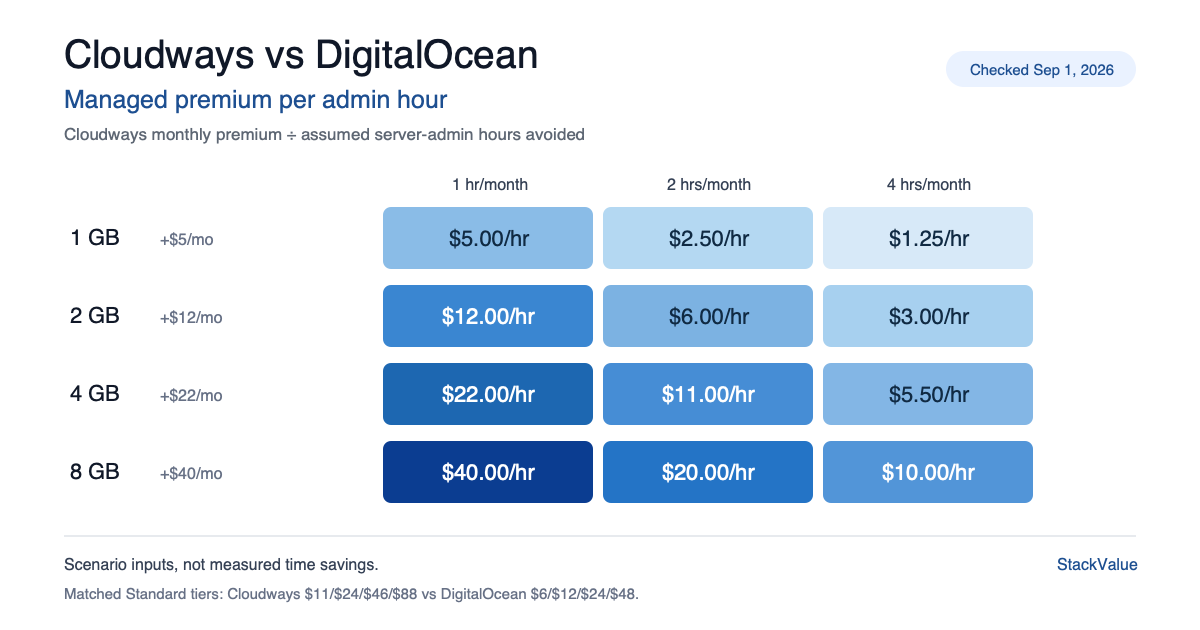
Across four matched Standard tiers, Cloudways adds $5, $12, $22 or $40 per month to the DigitalOcean Basic price. If the managed layer avoids 1, 2 or 4 admin hours per month, the 1 GB premium costs $5.00, $2.50 or $1.25 per hour; the 8 GB premium costs $40.00, $20.00 or $10.00 per hour.
Key finding The $5–$40 premium buys management, not more RAM, storage or included transfer. The time-savings table is scenario-based; StackValue has not measured the hours Cloudways saves.
Prices verified 1 September 2026 against each vendor’s own pricing page, linked in full below.
Updated 8 September 2026. Fixed a link that pointed at a slug this site never published, so it returned a 404. It now points at the memory measurement article.
Cloudways costs $11/month for a 1 GB DigitalOcean Standard server that costs $6/month when bought directly from DigitalOcean. The difference is $5/month. At 2 GB the difference is $12, at 4 GB it is $22, and at 8 GB it is $40.
KEY FINDING. Across the four like-for-like Standard tiers checked, Cloudways costs 1.83x to 2.00x the underlying DigitalOcean Basic Droplet. That premium buys a managed web stack, security patching, monitoring, staging, backup tooling, migration help and support. It does not buy a different amount of RAM, storage or included transfer.
The price half of that trade is in the managed hosting cost calculator, which shows the bare server as a gray bar under every managed option. The distance between the two bars is what an hour of your own time has to be worth.
Choose Cloudways when you run WordPress or another supported PHP application and want to give up server administration. Choose DigitalOcean direct when you need full control, a custom stack or the lowest infrastructure bill and can operate it yourself.
Prices and product details were checked 1 Sep 2026 against the vendors’ current public pages. No temporary promotion is included in the calculations.
Cloudways vs DigitalOcean price comparison
Cloudways Flexible can place its managed layer on a DigitalOcean server. Its public DigitalOcean page lists a Standard server series whose RAM, CPU, storage and transfer match DigitalOcean’s Basic Regular Droplets at the sizes below.
| Server specification | DigitalOcean direct | Cloudways Standard | Monthly premium | Cloudways multiple |
|---|---|---|---|---|
| 1 GB RAM, 1 vCPU, 25 GB, 1 TB transfer | $6 | $11 | $5 | 1.83x |
| 2 GB RAM, 1 vCPU, 50 GB, 2 TB transfer | $12 | $24 | $12 | 2.00x |
| 4 GB RAM, 2 vCPU, 80 GB, 4 TB transfer | $24 | $46 | $22 | 1.92x |
| 8 GB RAM, 4 vCPU, 160 GB, 5 TB transfer | $48 | $88 | $40 | 1.83x |
Sources: Cloudways managed DigitalOcean plans and DigitalOcean Droplet pricing.
This is a price-and-responsibility comparison, not a performance benchmark. StackValue has not load-tested Cloudways against a separately configured DigitalOcean Droplet, so this article does not claim that equal specifications produce equal page speed or throughput.
Cloudways Premium is a separate product line
Cloudways also lists DigitalOcean Premium servers. Do not mix these prices into the Standard table.
| Server specification | Cloudways Standard | Cloudways Premium | Premium uplift |
|---|---|---|---|
| 1 GB RAM | $11 | $14 | $3 |
| 2 GB RAM | $24 | $28 | $4 |
| 4 GB RAM | $46 | $54 | $8 |
| 8 GB RAM | $88 | $99 | $11 |
Cloudways identifies Premium as the NVMe/faster-processor option. A fair Premium comparison would require matching it to the appropriate DigitalOcean Premium Droplet, not the Basic Regular prices used above. This page therefore uses Standard only for the management-premium calculation. The Premium row is compared against DigitalOcean’s own Premium Droplet prices in Cloudways Standard vs Premium: what the extra $3 to $11 a month buys. A reseller is also not the only way to buy management: managed DigitalOcean hosting sets the same Droplet against RunCloud, ServerPilot and SpinupWP, which charge a flat fee instead of a multiple.
What you actually pay
The headline price is not the whole invoice. These are the purchase conditions visible in the current official material.
| Field | Cloudways Flexible on DigitalOcean | DigitalOcean direct |
|---|---|---|
| Billing currency | USD | USD |
| Region | Choose an available DigitalOcean data center at launch | Choose a DigitalOcean region at creation |
| Tax/VAT | Added where required, based on billing location | Added where required, based on tax location |
| Promo term used in this article | None | None |
| Renewal price | No introductory-to-renewal jump modeled; usage is pay-as-you-go | No introductory-to-renewal jump modeled; usage is pay-as-you-go |
| Amount due today | $0 for the advertised eligible 3-day trial; post-trial usage is billed after upgrade | Account-specific signup or payment verification may apply; no annual prepayment is included in the plan price |
| Price checked | 1 Sep 2026 | 1 Sep 2026 |
Cloudways says Flexible servers are billed by usage and invoiced monthly. DigitalOcean says bundled CPU Droplets accrue per-second charges with a 60-second minimum and a 672-hour monthly cap. Applicable tax varies by customer location for both services. See the vendors’ Cloudways billing guide, Cloudways tax guide, DigitalOcean Droplet billing documentation and DigitalOcean billing overview.
Backups are not included in the comparison price
Cloudways configures automated off-site backups, but the storage is a separate usage charge. Its Help Center lists $0.033 per GB of backup storage for Cloudways Flexible and says charges are rounded in $0.50 increments. The bill depends on stored incremental backup data, not simply the server’s disk capacity. Cloudways backup charges.
DigitalOcean direct offers multiple backup price models. Its current documentation lists Basic weekly backups at 20% of Droplet cost, Basic daily backups at 30%, and usage-based schedules from $0.01 to $0.04 per GiB-month, depending on frequency. These are DigitalOcean image backups, not the same managed workflow as Cloudways’ application/server backup controls. DigitalOcean backup pricing.
Do not compare $0.033/GB with 20% and call the cheaper number the winner. The billing units, restore controls, retention and service layer are different. Compare the restore process you need, then calculate its price.
What does the Cloudways premium cost per admin hour?
There is no defensible universal claim that managed hosting saves two or four hours every month. The hours depend on the operator, number of sites, update frequency and incidents. The useful calculation is a sensitivity table: if Cloudways removes 1, 2 or 4 hours of server work per month, what did each saved hour cost?
| Server size | Annual premium | If 1 hr/month is saved | If 2 hrs/month are saved | If 4 hrs/month are saved |
|---|---|---|---|---|
| 1 GB | $60 | $5.00/hr | $2.50/hr | $1.25/hr |
| 2 GB | $144 | $12.00/hr | $6.00/hr | $3.00/hr |
| 4 GB | $264 | $22.00/hr | $11.00/hr | $5.50/hr |
| 8 GB | $480 | $40.00/hr | $20.00/hr | $10.00/hr |
Formula:
effective cost per admin hour = annual Cloudways premium / annual server-admin hours avoided
Example: the 2 GB Cloudways Standard plan costs $12/month more than buying the matching DigitalOcean Droplet directly. That is $144/year. If the managed layer removes two hours of server work each month, the scenario rate is $144 / 24 = $6 per hour.
These are scenarios, not measured time savings. They let you insert your own estimate without presenting an invented industry average as fact.
What the Cloudways managed layer buys
Cloudways’ current DigitalOcean page lists the following in the managed service:
- 24/7 chat and ticket support
- regular security patching and a dedicated firewall
- automated backup controls and point-in-time restore tooling
- server and application monitoring
- staging, cloning and one-click application workflows
- managed migration assistance
- a preconfigured Nginx, Apache, Varnish, Memcached and Redis stack
- SSL controls, SSH/SFTP access and team management
Those features remove setup and recurring server tasks. They are particularly relevant to WordPress, WooCommerce, Magento, Laravel and other PHP applications that Cloudways explicitly supports.
The premium does not remove every website task. You still own application and plugin decisions, broken updates, content, user support, backup-retention choices and restore acceptance. Managed hosting reduces infrastructure work; it does not turn an application into a maintenance-free service.
For a concrete view of the work being priced, see the four failures in our WordPress, Docker and Caddy incident log. For capacity, our WordPress Docker memory measurement separates application memory from OS and container overhead.
When DigitalOcean direct is the better choice
Choose DigitalOcean direct when one or more of these are true:
- You need a custom Docker, Node.js, Python, database or multi-service stack.
- You want root-level control over packages, networking and deployment.
- You already maintain Linux servers, monitoring and backups.
- You can share those operating systems across several applications.
- Minimizing the infrastructure bill matters more than removing administration.
DigitalOcean also includes products outside a single Droplet, including managed databases, Kubernetes, object storage and load balancers. A direct account is the more flexible platform; that flexibility is also why you remain responsible for the architecture and operating system.
When Cloudways is worth the premium
Choose Cloudways when these conditions fit better:
- The workload is a supported PHP application, especially WordPress or WooCommerce.
- You do not want to assemble and maintain the web stack yourself.
- Staging, cloning, backup controls and support are worth more than the monthly premium.
- A server incident would interrupt higher-value work.
- The sensitivity table produces an hourly cost you would willingly pay.
At 1 GB, the management premium is only $60/year. At 8 GB it is $480/year. The work to patch a server does not necessarily rise in proportion to RAM, so the managed layer is usually easier to justify at small tiers. At larger tiers, calculate your real admin time rather than assuming the extra $40/month is automatically worthwhile.
Bottom line
Cloudways Standard costs roughly twice the matching DigitalOcean Basic server across the four tiers checked. The decision is not whether Cloudways is “expensive” in isolation. It is whether its $5, $12, $22 or $40 monthly premium is lower than the value of the server work and support burden it removes for you.
- Pick Cloudways for a supported web application when you want a managed stack and support.
- Pick DigitalOcean direct for full control, custom workloads and the lowest base infrastructure price.
- Use the 1/2/4-hour table with your own time estimate before deciding.
If the alternative you are weighing is another managed host rather than a bare server, Cloudways vs Kinsta pricing puts the two managed options on the same terms: what each meters, what each includes, and where the overages land. For Cloudways on its own, including the other four clouds it resells and every add-on, see the Cloudways pricing breakdown.
Method and limits
- Prices and public product details were checked on 1 Sep 2026 in the vendors’ current US-English pages and documentation.
- The four Standard rows match published RAM, vCPU, storage and transfer allowances. They do not establish equal application performance.
- No temporary Cloudways promotion, coupon, account credit or DigitalOcean signup credit is included.
- Tax is account-specific and excluded from the comparison prices.
- Backup storage is excluded from the base plan table and explained separately because the two vendors bill and operate it differently.
- The 1/2/4-hour values are explicit scenarios. StackValue has not measured how many hours Cloudways saves a representative customer.
- StackValue has not run a Cloudways-vs-DigitalOcean performance benchmark and does not claim first-hand use of either service in this comparison.
- A link to the managed hosting cost calculator was added on 5 Sep 2026. No price, table or conclusion in this article changed.