Cloudways or Kinsta: which costs less?
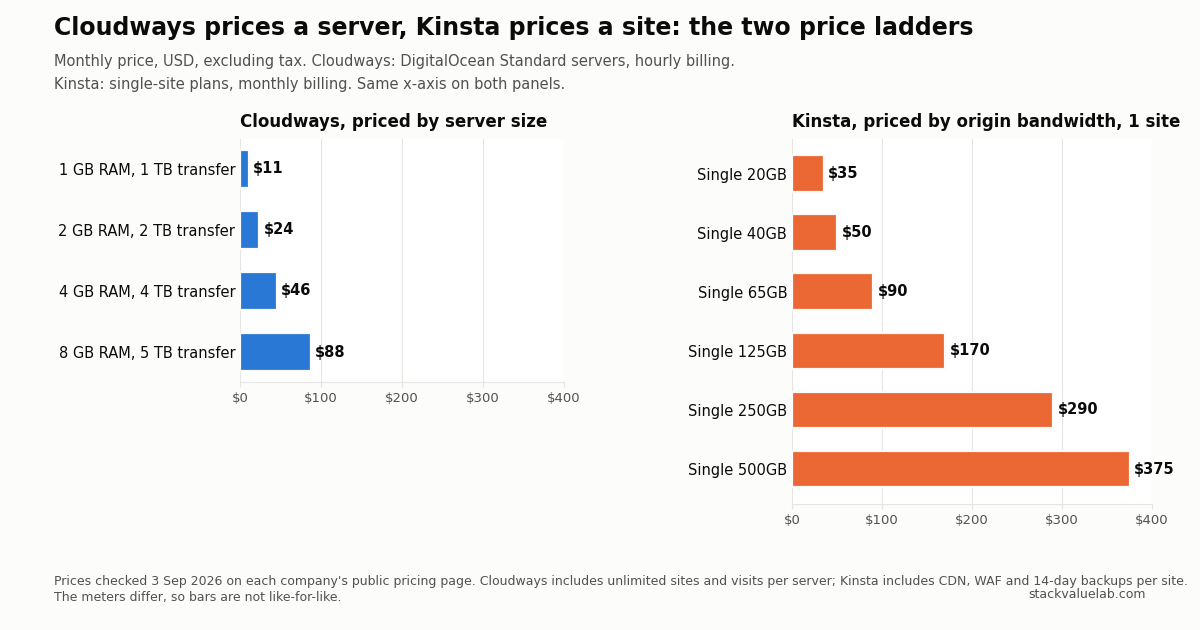
The cheapest plans are $11 at Cloudways and $35 at Kinsta, but they meter different things. Cloudways sells a server with unlimited sites and visits; Kinsta sells one site with 10 GB of storage, a CDN, a managed firewall and 14-day backups, metered on origin bandwidth or visits at $0.50 per GB or per 1,000 visits over the plan. Redis is included at Cloudways and $100 per site at Kinsta.
Key finding Kinsta’s 20 GB bandwidth allowance and Cloudways’ 1 TB are measured at different points in the path, before and after the edge cache. They are not convertible into each other.
Prices verified 3 September 2026 against each vendor’s own pricing page, linked in full below.
Updated 8 September 2026. Kinsta rounds its annual plans up when it prints a monthly figure. This page repeated $30 and $59 as if they were the arithmetic; $350 and $700 divided by twelve are $29.17 and $58.33. The rounded display and the effective monthly cost are now labelled separately.
KEY FINDING. The cheapest paid plan is $11 per month at Cloudways (a 1 GB DigitalOcean server) and $35 per month at Kinsta (Single 20GB, or $350 for the year, which Kinsta displays as $30 a month and which actually divides to $29.17). That 3.2x gap is real, but it is not a like-for-like price, because the two companies meter different things. Cloudways sells a server: unlimited sites and visits inside 1 GB of RAM and 1 TB of transfer. Kinsta sells a site: one install, 10 GB of storage, 125 GB of CDN traffic and either 20 GB of origin bandwidth or 35,000 visits, with a CDN, a managed firewall, malware removal and 14 days of backups included. Cloudways charges from $4.99 per domain for its Cloudflare Enterprise CDN; Kinsta charges $100 per site per month for Redis, which Cloudways includes.
Both are in the managed hosting cost calculator, along with the control panel route, priced at the bandwidth you actually use rather than at a plan boundary.
Prices checked 3 September 2026 on both companies’ public pricing pages. USD, excluding tax. Neither price was tested with a purchase.
Disclosure: StackValue has a disclosed affiliate relationship with Cloudways and none with Kinsta. The affiliate links are in the box at the end of this page and do not change any price or conclusion here.
Answer in 30 seconds
Pick by the meter, not by the headline number.
- You run several small sites and can size a server. Cloudways. One 2 GB server at $24 per month can host as many sites as fit in it. Kinsta charges per install: five sites start at $115 per month.
- You run one site and want the security and CDN layer done for you. Kinsta. The $35 plan includes the CDN, a managed WAF, malware removal, an uptime SLA of up to 99.99% and unlimited migrations. Reproducing that on Cloudways means add-ons and your own monitoring.
- Your traffic is spiky. Kinsta’s overage is linear and predictable: $0.50 per extra 1,000 visits or per extra GB of origin bandwidth. Cloudways has no visit meter at all, but when a server runs out, the fix is a resize, not a fee.
- You need Redis or an object cache. Cloudways includes Redis and gives Object Cache Pro free on 4 GB servers and above. Kinsta sells Redis at $100 per site per month.
Below are the prices as displayed, then what each plan includes, then the overages, then four worked scenarios.
Purchase reality
Note added 9 September 2026. Kinsta’s pricing page opens on the annual view, and the number it shows there is not the monthly price. On a fresh load the interval switch is set to Annual, and the Single 20GB card reads $30. Flip the same switch to Monthly and the card reads $35. The WP 2 card moves from $59 to $70 the same way. So the figure a first-time visitor sees is a rounded annual monthly-equivalent, and the actual cost of paying month to month is 17% higher than it. Neither displayed number is the exact arithmetic either: $350 over twelve months is $29.17 and $700 is $58.33, which is the rounding this page already separates out below. The annual saving Kinsta advertises, $70 and $140, is simply two months of the monthly price, which is what its “2 months off” label means. Checked on screen on 9 September 2026 by toggling the switch both ways.
What you are asked to pay, on what term, and what it renews at. Both companies show a single USD price regardless of location. Cloudways adds in its pricing FAQ that AWS and Google Cloud prices differ by region; the DigitalOcean plans used in this article carry no such note.
| Provider | Plan | Amount due today | Billing | Renews at | Tax | Checked |
|---|---|---|---|---|---|---|
| Cloudways | DigitalOcean Standard 1 GB | $0 (3-day trial, no card) | Hourly, billed monthly in arrears | $11.00/mo ($0.0164/hr) | Excluded | 3 Sep 2026 |
| Cloudways | DigitalOcean Standard 2 GB | $0 (3-day trial, no card) | Hourly, billed monthly in arrears | $24.00/mo ($0.0357/hr) | Excluded | 3 Sep 2026 |
| Cloudways | DigitalOcean Premium 1 GB | $0 (3-day trial, no card) | Hourly, billed monthly in arrears | $14.00/mo ($0.0208/hr) | Excluded | 3 Sep 2026 |
| Kinsta | Single 20GB, monthly | $0 (first month free, new accounts) | Monthly | $35.00/mo | Excluded | 3 Sep 2026 |
| Kinsta | Single 20GB, annual | $0 today, $350 after the first month | Annual | $350.00/yr (shown as $30/mo; $29.17 actual) | Excluded | 3 Sep 2026 |
| Kinsta | WP 2, monthly | $0 (first month free, new accounts) | Monthly | $70.00/mo | Excluded | 3 Sep 2026 |
| Kinsta | WP 2, annual | $0 today, $700 after the first month | Annual | $700.00/yr (shown as $59/mo; $58.33 actual) | Excluded | 3 Sep 2026 |
Three things to know about these rows.
First, Cloudways shows no annual plan and no annual discount on its pricing page. The hourly rate is the price. Kinsta’s annual billing is ten months for twelve, which is the “2 months off” shown on its page.
Second, Kinsta’s first-month-free offer applies only to the Single 20GB (or Single 35k), and WP 2 plans, and only to new accounts. The larger plans are charged from day one.
Third, the Cloudways pricing page opens with the Premium toggle on, which shows $14, $28, $54 and $99. Switching to Standard shows $11, $24, $46 and $88. The Standard tier is the one used for the $11 figure throughout this page; what the Premium toggle actually buys is set out in Cloudways Standard vs Premium. The full Cloudways pricing breakdown covers the other four clouds, every add-on and the overage rules.
What the money buys
| Plan | Sites | Server | Storage | Transfer or bandwidth | CDN | Visits | Backups | Migrations |
|---|---|---|---|---|---|---|---|---|
| Cloudways DO Standard 1 GB, $11 | Unlimited | 1 GB RAM, 1 vCPU | 25 GB SSD | 1 TB server transfer | $4.99/domain add-on | Unlimited | Automated, on-server | First site free |
| Cloudways DO Standard 2 GB, $24 | Unlimited | 2 GB RAM, 1 vCPU | 50 GB SSD | 2 TB server transfer | $4.99/domain add-on | Unlimited | Automated, on-server | First site free |
| Cloudways DO Standard 4 GB, $46 | Unlimited | 4 GB RAM, 2 vCPU | 80 GB SSD | 4 TB server transfer | $4.99/domain add-on | Unlimited | Automated, on-server | First site free |
| Kinsta Single 20GB, $35 | 1 | Not disclosed as RAM | 10 GB | 20 GB origin bandwidth | 125 GB included | Not metered on this plan | 14-day retention | Unlimited free |
| Kinsta Single 35k, $35 | 1 | Not disclosed as RAM | 10 GB | Not metered on this plan | 125 GB included | 35,000/mo | 14-day retention | Unlimited free |
| Kinsta WP 2, $70 | 2 | Not disclosed as RAM | 20 GB | 40 GB origin bandwidth | 250 GB included | Not metered | 14-day retention | Unlimited free |
| Kinsta WP 5, $115 | 5 | Not disclosed as RAM | 30 GB | 65 GB origin bandwidth | 500 GB included | Not metered | 14-day retention | Unlimited free |
Kinsta sells every plan in two versions at the same price: one metered on server bandwidth (traffic that reaches the origin after the edge cache), one metered on visits (unique IP addresses per 24 hours, including visits served from the edge cache). You choose the meter at sign-up.
Same money, different meters
The number that misleads people is bandwidth. Cloudways includes 1 TB of transfer on its smallest server; Kinsta includes 20 GB on its smallest plan. That looks like a 50x difference. It is not.
Kinsta’s 20 GB is origin bandwidth: what reaches the server after Kinsta’s CDN and edge cache have served the cached copies. Its CDN allowance on the same plan is 125 GB, and CDN overage is $0.05 per GB. Cloudways’ 1 TB is everything that leaves the server, because Cloudways has no CDN in front of it unless you add Cloudflare Enterprise at $4.99 per domain per month. The two figures measure traffic at different points in the path. Do not convert one into the other.
Visits are simpler to reason about but easy to overcount. Kinsta counts unique IP addresses per 24-hour period, and it counts them whether or not the edge cache answered, so a fully cached site still consumes the visit allowance. Cloudways does not count visits at all. What limits a Cloudways server is RAM and CPU under load, and the only signal that you have hit the limit is performance.
That difference shapes the cost curve:
- On Kinsta, growth is a linear fee. Exceed the plan and you pay $0.50 per 1,000 visits or per GB of origin bandwidth, and the site stays online.
- On Cloudways, growth is a step. Nothing is billed for traffic inside the transfer allowance, but when the server saturates you resize it: $11 to $24 to $46 to $88.
Neither is cheaper in general. Which one is cheaper for you depends on whether your traffic sits just above a Kinsta tier boundary, or just above a Cloudways server size.
Overages and add-ons
| Item | Cloudways | Kinsta |
|---|---|---|
| Traffic overage | $0.02/GB over transfer (DigitalOcean) | $0.50/GB origin bandwidth or $0.50/1,000 visits |
| CDN traffic overage | n/a (CDN is an add-on) | $0.05/GB |
| Storage overage | Resize server | $2/GB/month, measured daily |
| Extra site | $0 (within server capacity) | $30/site/month |
| CDN and edge cache | Cloudflare Enterprise from $4.99/domain/month | Included |
| Redis | Included | $100/site/month |
| Object cache | Object Cache Pro free on 4 GB+ servers | Not listed |
| Off-site backup copy | $0.033/GB, rounded up to $0.50 increments | External backups $2/site/month plus $1/GB |
| More frequent backups | Not priced on the pricing page | Every 6 hours $20/site/month, hourly $100/site/month |
| Malware removal | Malware Protection from $4/app/month | Included |
| Staging | Included | Included; premium staging $20/environment/month |
| Priority support | Advance Support $100/month, or 10% of invoice | Included 24/7 |
| Email hosting | Rackspace mailboxes $1.50/mailbox/month | Not offered |
Two of these rows decide most real bills. Redis at $100 per site turns a $35 Kinsta plan into $135 for a site that needs it, while the same requirement on Cloudways is included. In the other direction, Kinsta’s included CDN, WAF and malware removal are what Cloudways sells as add-ons, and what you would otherwise run yourself.
Four worked scenarios
These are example calculations from the listed prices, not quotes. Each assumes the site fits within the plan’s allowances unless stated.
Scenario A: one small site, nothing extra. Cloudways 1 GB at $11.00. Kinsta Single 20GB at $35.00 monthly, or $350.00 a year, which is $29.17 a month rather than the $30.00 Kinsta shows. Cloudways is $24.00 per month cheaper, and Kinsta’s version includes the CDN and firewall that Cloudways does not.
Scenario B: one site that needs Redis, a CDN, and an off-site backup copy. Kinsta: $35.00 plus Redis $100.00 equals $135.00, with the CDN included and 14-day backups included. Cloudways: a 4 GB server at $46.00 (Redis and Object Cache Pro included), Cloudflare Enterprise $4.99, and an off-site copy of a 10 GB backup at $0.033 per GB, which is $0.33 and rounds up to $0.50, for $51.49. The Redis line alone reverses the comparison.
Scenario C: five small sites. Kinsta WP 5 at $115.00, or $96.00 per month equivalent on the annual plan ($1,150.00 per year), with 30 GB of storage and 65 GB of origin bandwidth shared across the five. Cloudways: a 2 GB server at $24.00 if the five sites fit in 2 GB of RAM. That “if” is an assumption about your sites, not a fact from the price list. Our own measurement of a small WordPress stack, linked below, is the starting point for judging it.
Scenario D: a visits-metered site grows from 35,000 to 100,000 visits. Kinsta Single 35k: 65 extra thousands at $0.50 is $32.50 in overage, for $67.50 that month, or move to Single 125k at $90.00. Cloudways: no visit fee. If the 1 GB server handles the load, the bill is unchanged at $11.00; if it does not, the next size is $24.00. Whether it handles the load is a performance question this page cannot answer for you.
Where each one is the better buy
Kinsta is the better buy when the site is a single business site, the owner does not want to run a CDN, firewall or malware scanning, and predictable per-site pricing matters more than the lowest possible number. The uptime SLA of up to 99.99%, unlimited migrations and 24/7 support are part of the price, not extras.
Cloudways is the better buy when you host more than one site, when you need Redis or an object cache, when your traffic is high but cacheable, or when you are comfortable choosing a server size and resizing it. It is also the only one of the two where a 3-day trial requires no card.
Neither is a VPS. Both are managed layers over someone else’s compute. If your question is whether to pay for management at all, the Cloudways versus DigitalOcean cost-per-hour comparison and is self-hosting cheaper in 2026 cover that decision.
Method, limitations and sources
Method. Prices, allowances and add-on rates were read from the public pricing pages of both companies on 3 September 2026, in a browser, with Kinsta’s plan toggles set to each of the single-site, multi-site, bandwidth and visits views in turn, and Cloudways’ provider set to DigitalOcean with both the Standard and Premium toggles checked. Overage and backup rules come from each company’s own documentation, linked below. A link to the managed hosting cost calculator was added on 5 September 2026; no price, table or ranking in this article changed.
Limitations.
- No purchase was made. Trial terms, tax treatment and the first-month-free mechanics are as displayed, not as invoiced.
- Kinsta does not publish RAM, vCPU or PHP worker counts per plan on its pricing page, so no resource-for-resource comparison is possible. The “Not disclosed as RAM” cells are deliberate.
- Cloudways’ “unlimited websites” is bounded by the server. How many sites fit in 1 GB or 2 GB depends on the sites, and this page makes no claim about it beyond Scenario C’s stated assumption.
- Cloudways’ automated backup frequency options and retention are not priced on the pricing page and were not verified here.
- Kinsta’s first-month-free and Cloudways’ seasonal offers change. The purchase-reality table records what was displayed on the check date.
Sources.
- Kinsta WordPress hosting plans, plan prices, allowances, add-ons and annual billing
- Kinsta overages documentation, overage rates and how visits are counted, last updated 9 March 2026
- Cloudways pricing, DigitalOcean Standard and Premium server prices, hourly rates and add-on prices
- Cloudways guide to billing, hourly billing summarized monthly
- Cloudways bandwidth charges of infrastructure providers, $0.02 per GB over the DigitalOcean allowance
- Cloudways charges for off-site backups, $0.033 per GB and the $0.50 rounding rule
Related reading. What a WordPress container actually uses in RAM is the measurement behind Scenario C. VPS backup pricing and VPS bandwidth cost per TB put the overage rows above next to unmanaged providers.
Change log.
| Date | Change |
|---|---|
| 3 Sep 2026 | First published. Prices checked the same day. |
| 4 Sep 2026 | Noted, from the Cloudways pricing FAQ, that AWS and Google Cloud prices vary by region. No price changed. |