Who actually sells managed DigitalOcean hosting, and what does it cost?
DigitalOcean does not. Its managed products are App Platform, Managed Databases and Managed Kubernetes; a Droplet is an unmanaged virtual machine. The sellers are third parties in two shapes: a reseller like Cloudways that bundles the Droplet and charges a multiple of it ($11 / $24 / $46 / $88 for 1–8 GB), or a control panel on a Droplet you own at a flat fee (RunCloud $9, ServerPilot $5 + $0.50 per app, SpinupWP $12).
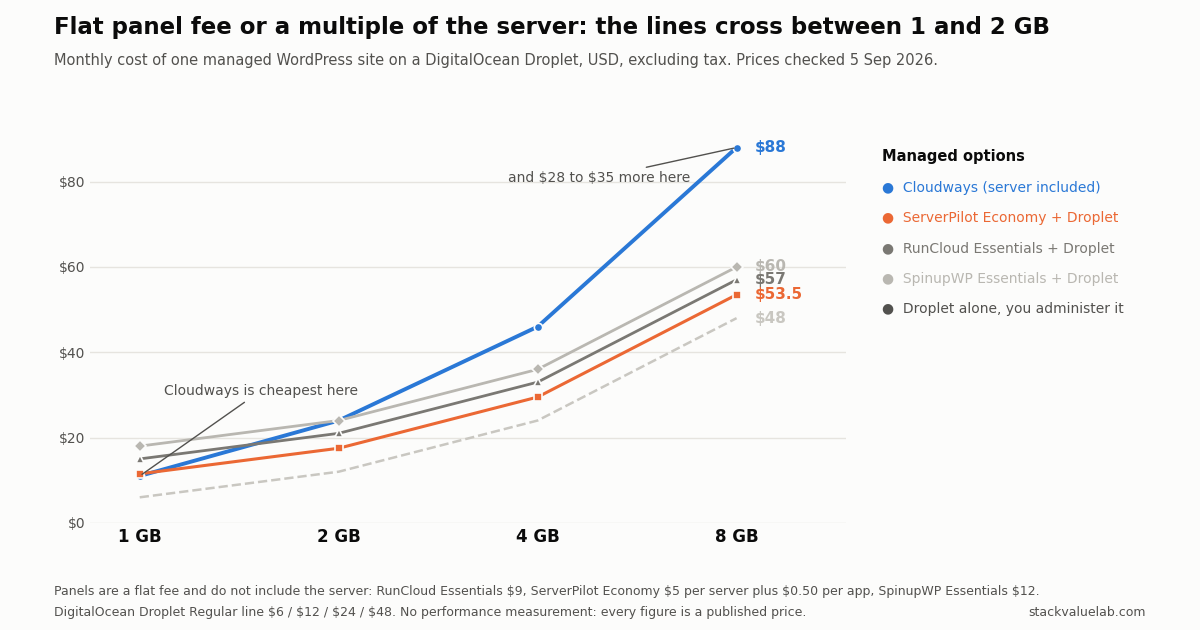
Key finding Flat fee versus a multiple crosses over between 1 GB and 2 GB. At 1 GB Cloudways is the cheapest managed option at $11; at 8 GB it is $88 against $53.50–$60 for a Droplet plus a panel, a gap of $336–$420 a year. The panels leave you as the person DigitalOcean talks to.
Prices verified 5 September 2026 against each vendor’s own pricing page, linked in full below.
KEY FINDING. DigitalOcean does not sell a managed Droplet. Its managed products are App Platform, Managed Databases and Managed Kubernetes; Droplets are described as plain “on-demand Linux virtual machines”. So every result for “managed DigitalOcean hosting” is a third party, and they come in two shapes that are priced completely differently. A reseller like Cloudways sells you the Droplet and the management in one bill, priced as a multiple of the server. A control panel like RunCloud, ServerPilot or SpinupWP attaches to a Droplet you own and buy yourself, at a flat fee. That difference decides which is cheaper, and it flips between the 1 GB and 2 GB sizes: at 1 GB the reseller is the cheapest option on this page, and at 8 GB it is the most expensive by $28 to $35 a month.
Every price in this article is also in the managed hosting cost calculator, where you can set the server size, the number of sites and the bandwidth and watch the crossover move for your own case.
What DigitalOcean actually sells
DigitalOcean’s product list has a managed tier for several things, but not for the virtual machine. Managed Databases, Managed Kubernetes, App Platform and Managed Weaviate are all there. Droplets are listed under Compute and described as “On-demand Linux virtual machines. Choose from shared CPU and dedicated CPU plans, with variable amounts of RAM, locally attached SSD storage, and generous transfer quotas.”
Nothing in that sentence includes patching your OS, configuring NGINX and PHP-FPM, setting up backups, or answering the phone at 3am. If you buy a Droplet, you are the system administrator (here is what that job looked like in our first three days on our own server). That is the gap the whole “managed DigitalOcean” category exists to fill.
App Platform is worth one line of clarification because it does come up in the same searches. It is a platform-as-a-service: you give it a repository, it builds and runs the app, and you never see a server. That is a different product from a managed Droplet, not a cheaper version of one.
The two shapes of “managed DigitalOcean”
A reseller buys the Droplet and sells it to you with the stack and the support on top. Cloudways is the one most people land on. Your billing relationship, and your support relationship, is with the reseller. If the underlying machine misbehaves, that is their problem to escalate.
A control panel is software you point at a Droplet in your own DigitalOcean account. It installs and configures the web stack, handles SSL, deployments, backups and updates, and gives you a dashboard instead of SSH. Your billing relationship for the server stays with DigitalOcean, and so does the problem when the server itself breaks. ServerPilot states this directly: “Servers are your servers at any cloud provider. You pay your cloud provider directly for your servers.” RunCloud’s own description is “you don’t need to be a Linux expert to build a website powered by Vultr, Linode, UpCloud, Hetzner, AWS, Google Cloud or DigitalOcean.”
That distinction is the reason the prices below are not directly comparable, and also the reason people are surprised by their second invoice.
What each one costs
Panel prices and Droplet prices, both taken from the vendors’ own pricing pages on 5 September 2026, before tax. The Droplet used is the Regular (shared CPU) line: $6, $12, $24 and $48 for 1, 2, 4 and 8 GB.
| Product | What you pay it | Server included |
|---|---|---|
| Cloudways | $11 / $24 / $46 / $88 for 1 / 2 / 4 / 8 GB | Yes |
| RunCloud Essentials | $9 a month, 1 server, unlimited web apps | No |
| ServerPilot Economy | $5 a month per server plus $0.50 per app | No |
| SpinupWP Essentials | $12 a month, 1 server, unlimited sites | No |
| SpinupWP Advanced | $19 a month, 1 server, unlimited sites | No |
Add the Droplet to the panels and the totals for one site look like this.
| One site, per month | 1 GB | 2 GB | 4 GB | 8 GB |
|---|---|---|---|---|
| Cloudways (all in) | $11 | $24 | $46 | $88 |
| ServerPilot Economy + Droplet | $11.50 | $17.50 | $29.50 | $53.50 |
| RunCloud Essentials + Droplet | $15 | $21 | $33 | $57 |
| SpinupWP Essentials + Droplet | $18 | $24 | $36 | $60 |
| SpinupWP Advanced + Droplet | $25 | $31 | $43 | $67 |
| Droplet alone, you administer it | $6 | $12 | $24 | $48 |
The pattern is not about which vendor is better value in general. It is arithmetic about how each one is priced.
A panel charges a flat fee no matter what server you attach it to. RunCloud is $9 whether the Droplet is $6 or $48. A reseller charges a multiple of the server: Cloudways runs 1.83 to 2.00 times the Droplet’s direct price across this range, so the management cost grows with the machine.
Flat versus proportional crosses over between 1 GB and 2 GB (what a small WordPress stack used on our own server). At 1 GB Cloudways is the cheapest managed option here, and ServerPilot is within fifty cents of it. At 8 GB Cloudways costs $88 where the same Droplet plus a panel is $53.50 to $60, a difference of $28 to $35 a month, or $336 to $420 a year.
Where the price difference actually goes
Two things are worth putting next to those numbers before treating the cheaper column as the better deal.
Who you call. With a panel, DigitalOcean is your hosting provider and DigitalOcean’s support scope is the infrastructure, not your WordPress install or your NGINX config. The panel vendor supports the panel. There is a seam between them, and you are standing in it. With a reseller, there is one vendor for the server and the stack.
What is bundled. Cloudways includes staging, Redis, a server firewall, one free migration, and Object Cache Pro on 4 GB and larger servers. The panels bundle different things and meter others: RunCloud Essentials includes full and incremental backups with 2 GB of backup storage, then charges $2 a month for 100 GB and $8 for 500 GB. ServerPilot’s per-app pricing means a second and third site add $0.50 each on Economy, where Cloudways, RunCloud and SpinupWP allow unlimited sites on the server you are paying for.
Neither of those is a reason to ignore a $35 a month gap at 8 GB. They are the reason the gap is not free money.
Account, billing, support and backups
The seam described above, in one table. Every cell was read from the vendor’s own pages on 13 October 2026 and is quoted where it matters; where a page did not say, the cell says UNKNOWN. This is what the vendors publish, not a test of their support.
| Cloudways (reseller) | Panel on a Droplet you own (RunCloud, ServerPilot, SpinupWP) | Droplet alone | |
|---|---|---|---|
| Whose account the server is in | Not stated on the Cloudways pages we could read without logging in. UNKNOWN. | Yours. ServerPilot: “Servers are your servers at any cloud provider.” SpinupWP: without a subscription, “you’ll have to access your servers via SSH or via your VPS provider.” | Yours. DigitalOcean: “you manage your infrastructure and billing with teams.” |
| Who bills for the server | Cloudways, inside its plan price. | DigitalOcean, separately from the panel fee. ServerPilot: “You pay your cloud provider directly for your servers.” | DigitalOcean. |
| Where you open a ticket | Cloudways. DigitalOcean says its support plans “do not apply to Cloudways” and points those customers to Cloudways’ own site. | Two places. DigitalOcean’s support page offers technical support “for your DigitalOcean account or infrastructure”, and its support plans page says to contact support “using the account that is subscribed to the current support plan and has a problem.” The panel vendor answers for the panel; SpinupWP, for example, lists “Customizing server configs for you (Nginx, PHP, MySQL, etc.)” and “Malware cleanup” among the things it won’t help with. | DigitalOcean, for the account and infrastructure. Ticket support is free for every customer; paid plans start at $24 a month. |
| Backups, and where they are stored | Cloudways offers automated and on-demand backups; its pricing page adds “$0.033/GB per server” for offsite backup storage. | Your choice. RunCloud offers its own storage or a third-party store, for which “you’ll need to create an account with the service”. SpinupWP lists Backblaze B2, Wasabi, Amazon S3, DigitalOcean Spaces, Google Cloud Storage and Akamai/Linode Object Storage as backup providers. ServerPilot’s plan comparison has no backup row. DigitalOcean’s own Droplet backups are a further option, billed by DigitalOcean. | Yours to set up. DigitalOcean’s percentage-priced Droplet backups add 20% (weekly) or 30% (daily) of the Droplet’s cost per month. |
| If you stop paying for management | Not stated on the pages we read. UNKNOWN. | Depends on the panel. RunCloud: after a failed payment it retries for 10 days, then locks the account, and “Your web server will be disabled, automated backups will be paused, and SSL certificates will be revoked.” On cancellation it says “All servers and data associated with your account will be permanently deleted”, without saying whether that reaches the Droplet in your DigitalOcean account. SpinupWP: SSH or your VPS provider, as above. ServerPilot: usage costs “stop accruing when you delete the server from ServerPilot”; its page does not say what that does to the Droplet itself. | Not applicable. |
What follows from the table: with a panel you pay two vendors, open tickets with two, and decide where backups go. With Cloudways there is one bill and one support desk, but the Cloudways pages we could read don’t say whose cloud account the server is in or what happens to it when you leave, so ask Cloudways before relying on either.
Choosing
- One small site, 1 GB. The reseller is both the cheapest and the simplest option here. There is no size at which paying $18 for SpinupWP plus a $6 Droplet beats $11 all in.
- A 4 GB or 8 GB server. The panel route saves real money, and the saving grows with the machine. Take it if you are comfortable being the person DigitalOcean talks to.
- Several sites on one server. Check the metering before the headline price. ServerPilot bills per app; the others do not.
- Many servers. All three panels are priced for fleets in a way a reseller is not: RunCloud Professional is $19 for 50 servers, SpinupWP’s additional servers fall to $1 a month at volume. A reseller charges the full multiple on every server.
- You want no server at all. That is App Platform, or a different category of host entirely, not a managed Droplet.
This page compares Cloudways, RunCloud, ServerPilot and SpinupWP because those are the ones that come up for this search. Cloudways is also here for a second reason, stated in the disclosure at the end: StackValue earns a commission on it, and on none of the others. That does not set the result: every row is a published price, and at 4 and 8 GB every panel row costs less than Cloudways. It is not an exhaustive list of control panels, and it contains no performance measurement of any kind: every number above is a published price.
Change log
| Date | Change |
|---|---|
| 5 Sep 2026 | First published. All prices checked the same day on each vendor’s own pricing page. |
| 13 Oct 2026 | Added the account, billing, support and backup table, read from each vendor’s pages the same day, and said why Cloudways is on this page. Re-read the pricing pages: DigitalOcean Regular Droplets, ServerPilot and SpinupWP showed the prices used above; the RunCloud and Cloudways pages did not give a usable price list to our automated read, so those prices stay as checked on 5 Sep 2026. |
Sources
- DigitalOcean product list and Droplet description: https://www.digitalocean.com/products
- DigitalOcean Droplet pricing: https://www.digitalocean.com/pricing/droplets
- Cloudways pricing, DigitalOcean provider: https://www.cloudways.com/en/pricing.php
- RunCloud pricing: https://runcloud.io/pricing
- ServerPilot pricing: https://serverpilot.io/pricing/
- SpinupWP pricing: https://spinupwp.com/pricing/
- DigitalOcean support plans and scope: https://docs.digitalocean.com/platform/support-plans/, https://docs.digitalocean.com/support/do-digitalocean-support-plans-apply-to-cloudways-or-paperspace/ and https://www.digitalocean.com/support
- DigitalOcean teams and billing: https://docs.digitalocean.com/platform/teams/
- DigitalOcean Droplet backup pricing: https://docs.digitalocean.com/products/backups/details/pricing/
- RunCloud backups, billing and cancellation: https://runcloud.io/docs/creating-backups, https://runcloud.io/docs/account-and-billing-faq and https://runcloud.io/docs/cancel-runcloud-subscription
- Related on this site: Cloudways pricing, line by line, Cloudways Standard vs Premium, Cloudways on DigitalOcean vs Vultr, Managed hosting vs a VPS you run yourself