What actually breaks when you self-host WordPress on Docker and Caddy?
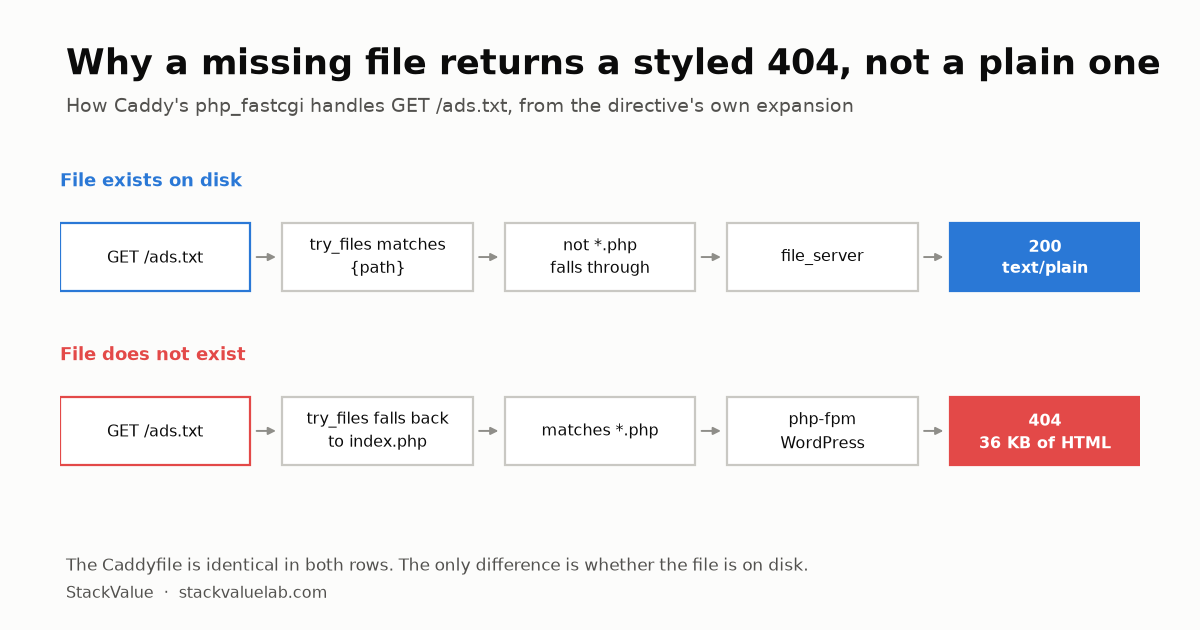
Four things in the first 72 hours, three of them silent. Root files like ads.txt return a WordPress 404 because php_fastcgi falls back to index.php when the file is missing. Caddy must mount the WordPress volume or every static asset 404s. Installing an SEO plugin 404s the sitemap you already submitted while the console still reports success. Posts created with WP-CLI never reach the sitemap until the plugin transient is cleared.
Key finding A missing root file does not produce a server 404. It produces an application 404 rendered as a full HTML page, so anything checking for a plain-text token sees markup and reports the file as absent.
We publish cost comparisons here, and one of them says self-hosting takes 24 to 48 hours a year of maintenance. It seemed fair to show our own bill.
Running your own stack means buying the pieces a managed host bundles. Everything except the server puts a published list price on each of them: monitoring, transactional email, offsite backup, CDN and object storage.
This site runs on a small VPS: Docker, Caddy for TLS and static files, WordPress on php-fpm, MariaDB. In the first three days, four things broke. None of them appear in the setup guides, and three of them fail silently. The site keeps working, so you only find out when something external tells you.
Verified 30 August 2026 against Caddy’s own documentation, linked below. Re-checked 13 October 2026 against the same pages and the Docker, WP-CLI, WordPress and Google documentation behind the command notes; the incidents themselves were not re-run.
1. Root-level static files return a WordPress 404
We added /ads.txt for AdSense. AdSense reported it missing. Opening it in a browser returned the WordPress “Oops! That page can’t be found” template, a 36 KB HTML page, HTTP 404.
The confusing part: /robots.txt worked, and so did a 32-byte verification file at the same level.
KEY FINDING. php_fastcgi is not a passthrough. It is shorthand for a route block, and Caddy documents the expansion. The part that matters here is below. Caddy’s full version also adds a trailing-slash redirect for directories that contain an index.php, and a transport fastcgi setting for the PHP proxy; neither changes whether a request for /ads.txt is served from disk or rewritten to index.php, which is the part shown:
@indexFiles file {
    try_files {path} {path}/index.php index.php
    try_policy first_exist_fallback
    split_path .php
}
rewrite @indexFiles {file_match.relative}
@phpFiles path *.php
reverse_proxy @phpFiles <php-fpm_gateway>
Read try_files literally. If /ads.txt exists on disk, {path} matches first, the request rewrites to itself, it is not a *.php path, and it falls through to file_server as a static file. If it does not exist, the fallback is index.php. The request goes to PHP, and WordPress answers with its own 404.
So a missing root file does not produce a server 404. It produces an application 404, rendered as a full HTML page, with all the styling and none of the meaning. Anything that checks for a plain-text file (an ad network, a domain verifier, a protocol that wants a token at your webroot) sees HTML and reports the file as absent.
The fix is that there is no fix. Put the file on disk and Caddy serves it. No Caddyfile edit, no plugin, no restart:
docker cp ads.txt <wordpress-container>:/var/www/html/ads.txt
docker exec <wordpress-container> chown www-data:www-data /var/www/html/ads.txt
Result: HTTP 200, content-type: text/plain, 59 bytes, no HTML.
Command caveats. Docker documents that files copied into a container “are created with UID:GID of the root user”, which is why the chown line is there. The file survives the container being recreated only because /var/www/html in the WordPress container is the shared volume described in section 2. Docker says data in a container’s own writable layer “doesn’t persist when the container is destroyed”, while volumes “retain data even after the containers using them are removed.” To take the same three readings on your own site: curl -s -o /dev/null -w '%{http_code} %{content_type} %{size_download}\n' https://example.com/ads.txt prints the status code, the content type and the body size in bytes.
The reason this is worth writing down is the diagnosis, not the repair. We spent the first minutes looking at the Caddyfile, which was correct the whole time.
2. Caddy must mount the WordPress volume, or every asset 404s
This one we caught before it hurt, because it fails loudly.
With mod_php, one process serves PHP and static files together. With php-fpm, they split: PHP goes over FastCGI to a socket, and static files are read from disk by the web server. Caddy’s own documentation is explicit that php_fastcgi should be paired with file_server to serve “your static files (your JS, CSS, images, etc) which aren’t otherwise handled by this directive and fell through.”
Fell through to disk. Caddy’s disk. If the Caddy container cannot see the WordPress files, PHP runs fine and every stylesheet, script and image returns 404. The site loads as unstyled HTML and the error looks like a theme problem.
caddy:
  volumes:
    - wp_data:/var/www/html:ro   # same volume WordPress writes to
wordpress:
  volumes:
    - wp_data:/var/www/html
Read-only for Caddy is deliberate: it needs to read files, never write them. The side effect is that you cannot docker cp into the Caddy container, root files like the one in section 1 have to go into the WordPress container, and Caddy picks them up through the shared volume.
3. Installing an SEO plugin silently 404s the sitemap you already submitted
WordPress core has generated /wp-sitemap.xml since 5.5. We submitted that URL to Google Search Console and Bing Webmaster Tools. Both reported success.
Then we installed an SEO plugin. It disabled the core sitemap and published its own at /sitemap.xml.
Nothing announced this. /wp-sitemap.xml now returns 404. Both consoles still listed it as a submitted sitemap with a green “Success” status. Google’s help page explains its side: the report “shows the status of the last request for each sitemap”, and Google recrawls a sitemap “at a pace unrelated to the regular site crawl”, so a Success recorded before the plugin went in can stay on screen until the next fetch. Bing’s help page did not load for our check, so the Bing half of this is our observation only.
| URL | Before plugin | After plugin |
|---|---|---|
/wp-sitemap.xml |
200 | 404 |
/sitemap.xml |
404 | 200 |
robots.txt Sitemap: line |
core sitemap | plugin sitemap |
The plugin does update robots.txt, which is how we found it. Search engines following robots.txt will find the new file eventually. But the stale entry sits in your console reporting success, and if you are watching that dashboard to confirm your sitemap works, it tells you what you want to hear.
Check after installing any SEO plugin: fetch the sitemap URL you submitted, and read the Sitemap: line in your live robots.txt. If they disagree, resubmit.
4. Posts created through WP-CLI do not appear in the sitemap
We publish with wp eval-file and wp_insert_post() rather than the editor. The post went live, appeared on the homepage, and rendered correctly.
The sitemap did not change. It stayed at 13 URLs with the new post absent, and the <lastmod> values were all from before the post existed.
The plugin caches its sitemap in a transient. The cache did not invalidate for a post created this way, so the sitemap kept serving the old list.
wp transient delete --all
wp post update <id> --post_status=publish
After that: 14 URLs, new post present, lastmod current.
Command caveats. --all is wider than this problem: WP-CLI documents it as “Delete all transients”, so every plugin’s cached values go, not only the sitemap’s. WordPress treats transients as disposable and tells developers their code “should have a fall back method to re-generate the data”, but --all is still a blunt tool, not a targeted fix. If a persistent object cache such as Redis or Memcached is installed, WP-CLI says “the transient cache skips the database”; wp transient type shows which one you have. On multisite, WP-CLI’s own example pairs --all --network with a loop over wp site list. The second command re-saves a post that is already published. It is the step we ran, and we have not found documentation saying it is what refreshes any particular plugin’s sitemap.
This one is the most dangerous of the four, because it is invisible from every direction. The post works. The homepage links to it. The console shows a healthy sitemap. The only symptom is a number you would have to already know to check.
If you publish programmatically, verify the sitemap URL count after every publish. One line, and it is the difference between a post being discoverable and sitting there unlisted.
The one that was not a bug
While auditing the site we found this in the page source:
_googlesitekitUserData = {"user":{"id":1,"email":"...@gmail.com", ...
An analytics plugin embedding the site owner’s email address in a script tag on every page. That looks like a serious leak.
It is not. Fetching the same URL without session cookies returns zero occurrences, no admin bar, no user data. Those assets are only emitted for logged-in users with the right capability.
Your logged-in HTML is not your public HTML. If you audit your own site while signed in to wp-admin, you are reading a document nobody else receives. Check with credentials omitted before concluding anything:
await (await fetch(url, {credentials: 'omit'})).text()
Keep the option as written. In the Fetch API, credentials: 'omit' means “Never send credentials in the request”, while the default is same-origin, which sends your login cookies when you run this from a page on your own site.
We nearly filed a privacy incident against ourselves over this.
What this says about the cost of self-hosting
Four failures in seventy-two hours, on a stock configuration, with no traffic. Three of them silent.
None were hard once diagnosed. Section 1 was a two-line fix. Section 4 was one command. The time did not go into repair; it went into noticing, and then into understanding a try_files line well enough to be sure the repair was right rather than lucky.
That is the shape of the maintenance number in our other comparisons. It is not four hours of typing. It is four hours of finding out that something you assumed was working is not, in a system where the failure mode is a page that loads fine.
Managed hosting removes exactly this category of work, and it charges 1.83x to 2.00x the price of the server to do it. Whether that is a good trade depends on what an hour of this is worth to you. Our other article puts a number on it; this one is what the hours actually contain.
Whether the hours are worth it depends on what you are replacing. We priced six apps in a self-hosting versus subscription comparison.
Method and limits
- Caddy behaviour is quoted from the official
php_fastcgidocumentation, checked 30 August 2026 and again 13 October 2026. The expansion above is an excerpt of Caddy’s own, not our paraphrase: every line shown is in the current documentation, which also wraps them in arouteblock with a trailing-slash redirect and atransport fastcgisetting. - Every failure described here happened on this site and was fixed on this site. Before-and-after values (HTTP codes, byte counts, sitemap URL counts) are what we measured.
- Those values were not re-measured for the 13 October 2026 update, and the raw command output is not reproduced here. The
curlline in section 1 takes the same three readings on your own site. - We do not name the SEO plugin in section 3 and 4, because we have not tested whether other plugins behave the same way and we do not want to imply the behaviour is unique to one of them. The check applies to any plugin that replaces the core sitemap.
- We have not measured how long each diagnosis took. The “seventy-two hours” is the window, not a time cost. We deliberately did not estimate hours we did not record.
- This is a single configuration: one VPS, Docker Compose, Caddy 2, WordPress on php-fpm, MariaDB. Our RAM measurement on the same server lists the images it ran:
caddy:2-alpine,wordpress:6-php8.3-fpm-alpineandmariadb:11. Those tags name a major version (and, for PHP, a minor version), not a patch release, and this article does not record which patch versions were running during these three days, so it claims none. Nothing here is claimed to generalise to nginx, Apache, or managed WordPress.
Sources
- Caddy documentation,
php_fastcgidirective (expanded form andfile_serverpairing) - Caddy documentation,
try_filesdirective - WordPress core sitemaps, available since 5.5
- Docker documentation,
docker container cpand storage overview (file ownership, writable layer, volumes) - WP-CLI,
wp transient,wp transient deleteand the WordPress Transients API - Google Search Console Help, Sitemaps report
- MDN, Fetch API request options (
credentials) and the curl manual (--write-outvariables)
Same server, different question. Once it stopped breaking, we measured what it actually consumes: 262 MiB for the WordPress stack, and 491 MiB more in use outside the containers.