Is self-hosting n8n cheaper than n8n Cloud?
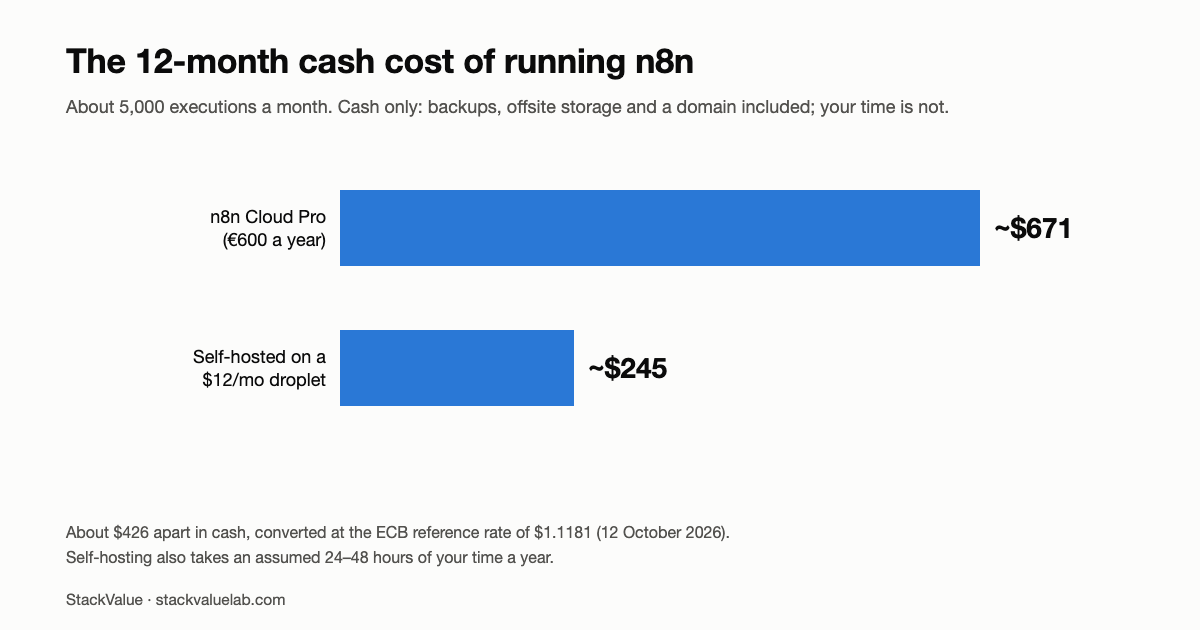
At about 5,000 executions a month, this model puts self-hosting at roughly $245 a year in cash against €600 (~$671) for Cloud Pro, a saving of about $426 that costs an assumed 24–48 hours of your time a year, roughly $9–18 per hour. Above 10,000 executions there is no default winner: compare current Cloud pricing with measured self-hosting.
Key finding The Business plan at €667/month is a self-hosted licence, not the next Cloud tier: n8n’s pricing page lists it as self-hosted only.
Prices verified 28 August 2026 against each vendor’s own pricing page, linked in full below.
Updated 13 October 2026. Re-checked n8n’s pricing page: Starter €20 and Pro €50 a month billed annually and Business €667 (self-hosted only) are unchanged, and the Pro card lists up to 50 concurrent executions. The help-centre article that described Pro-1 and Pro-2 no longer loads, so that detail is marked as unverified. n8n’s euro prices are now converted at one rate, the ECB reference rate of $1.1181 for 12 October 2026, which moves the cash difference to about $426; Hetzner’s dollar figures are its own USD list prices. The 2–4 operating hours a month are labelled as a model assumption with a sensitivity table, Cloud’s own operating time is no longer shown as zero, and three generalisations (that only self-hosting passes a security review, that a 1 GB server will run out of memory, and that every comparison gets this wrong) are narrowed to what we can support.
Updated 7 September 2026. This article prices the n8n instance itself. If your workflows call an LLM, the model bill is a separate line that is about to move: Google’s pricing page doubles the Gemini 3.8, 3.7 and 3.6 Flash rates on 1 January 2027, and OpenAI guarantees GPT-5.6 Sol’s promotional rate only to 21 November 2026. The per-call arithmetic is in our LLM API price note. Nothing below changes.
The quick comparisons we read put “€20/month” next to “$5 VPS” and call it a day. That comparison is wrong, and it’s wrong in both directions, self-hosting costs more than the VPS line item, and Cloud costs more than the sticker once you cross an execution threshold.
Here is the actual arithmetic, with the parts people leave out.
TL;DR
- Under ~2,500 executions/month and you value your evenings: n8n Cloud Starter, €20/month billed annually. On the cash lines in this article, self-hosting saves about $24–110 a year against Starter (on a $12 droplet, or a 1 GB $6 droplet we have not load-tested) and costs you a maintenance job.
- Over 10,000 executions/month: do not compare Cloud with the €667 Business licence. n8n has documented a 50,000-execution Cloud Pro-2 tier (that page no longer loads, so treat it as unverified), while Business is self-hosted. Compare the current Cloud price with measured infrastructure and operating time.
- The break-even isn’t a price. It’s a person. Self-hosted n8n is free software running on infrastructure you now operate. If nobody on your team wants that pager, Cloud is cheaper than it looks.
What each option actually costs
n8n Cloud plan structure
| Plan | Public price | Executions/month | Concurrent executions | Hosting |
|---|---|---|---|---|
| Starter | €20/mo, billed annually | 2,500 | 5 | Hosted by n8n |
| Pro | €50/mo, billed annually | 10,000 | Up to 50 | Hosted by n8n |
| Pro-2 (unverified) | Not shown on the public pricing card | 50,000 | 50 | Hosted by n8n |
| Enterprise | Custom | Custom | 200+ | Hosted or self-hosted |
Business at €667/month for 40,000 executions is a paid self-hosted edition, not the next n8n Cloud tier. It adds governance features such as SSO, SAML, LDAP, environments and Git-based version control to infrastructure you operate.
n8n’s public pricing page lists Starter, Pro, Business and Enterprise. Its help-centre article on Cloud tiers separately identified Pro-1 at 10,000 executions and Pro-2 at 50,000, but it no longer loaded when re-checked on 13 October 2026, so the Pro-2 row above is unverified. The pricing page shows one Pro card: 10,000 executions and up to 50 concurrent executions, and its FAQ says Pro comes in more than one plan size. Because the public pricing card does not show a Pro-2 price, this article does not invent one.
Two things matter. First, active workflows are unlimited; the usage meter is workflow executions. Second, the €667 Business price must not be used as the Cloud upgrade price above Pro. Cloud and paid self-hosted editions are different purchasing paths.
Self-hosted: the line items people include
The Community Edition is free. What you pay for is the machine.
| Provider | Plan | vCPU | RAM | Disk | Transfer | Price/mo |
|---|---|---|---|---|---|---|
| DigitalOcean | Basic | 1 | 512 MB | 10 GB | 500 GB | $4 |
| DigitalOcean | Basic | 1 | 1 GB | 25 GB | 1,000 GB | $6 |
| DigitalOcean | Basic | 1 | 2 GB | 50 GB | 2,000 GB | $12 |
| DigitalOcean | Basic | 2 | 4 GB | 80 GB | 4,000 GB | $24 |
| Hetzner | CX23 | 2 | 4 GB | 40 GB NVMe | 20 TB | €5.49 ($6.49 in Hetzner’s USD list) |
| Hetzner | CX33 | 4 | 8 GB | 80 GB NVMe | 20 TB | €8.49 ($9.99 in Hetzner’s USD list) |
Sources: DigitalOcean Droplet pricing, Hetzner price adjustment notice.
Note: Hetzner raised cloud prices on 1 April and again on 15 June 2026. CX23 went €3.99 → €5.49, and the CPX and CCX lines rose by 144% and 169%. The figures above are the post-June prices for Germany/Finland, excluding VAT and the Primary IPv4 address. Hetzner’s cost-optimized page marked every CX plan as not available on 2 and 8 September and 13 October 2026, so confirm you can provision in your region before planning around it.
Do not treat a low VPS price as proof of capacity. n8n does not publish one universal minimum for every deployment, and this comparison has not load-tested the 512 MB, 1 GB or 2 GB plans. Choose a test candidate from the price table, then measure memory, execution duration and concurrency with your own workflows before production use.
Self-hosted: the line items people leave out
This is where the honest comparison lives.
| Item | Typical annual cost | Can you skip it? |
|---|---|---|
| Server ($12/mo tier) | ~$144 | No |
| Backups (weekly Droplet backups, 20% of droplet cost) | ~$29 | No. A workflow database with no backup is a liability, not a saving |
| Object storage for offsite backups | ~$60 | Recommended |
| Domain for your instance | ~$12 | Practically yes, but you’ll want one for TLS |
| TLS certificate (Let’s Encrypt) | $0 | . |
| Your time | The real cost | No |
That last row is the one that decides it. Self-hosting n8n means you own: OS patching, Docker upgrades, n8n version upgrades (which occasionally include breaking changes to nodes), Postgres backups and (critically) restore testing, TLS renewal when the automation breaks, and being the person who notices at 2am that the container is in a crash loop.
This model assumes 2–4 hours a month in steady state, more in the first month (see what broke in our first three days of self-hosting WordPress) and on any upgrade that goes sideways. That is an assumption for the cost model, not a measurement; the sensitivity table below shows how the answer moves with it.
The 12-month comparison
Assumptions: 5,000 executions/month (above Starter, below Pro’s ceiling), a single production instance, Postgres as the database, backups actually configured.
| n8n Cloud Pro | Self-hosted ($12 droplet) | |
|---|---|---|
| Software | €600 (€50 × 12) | €0 |
| Server | . | ~$144 |
| Backups + object storage | . | ~$89 |
| Domain | . | ~$12 |
| Cash total (12 mo) | ≈ €600 / ~$671 | ≈ $245 |
| Cash difference | . | ~$426 saved |
| Your time (assumed 2–4 hrs/mo self-hosted) | Not zero, not modelled | 24–48 hours |
| Implied hourly rate of the saving | . | $9–18/hour |
That is the number this comparison turns on. On these assumptions, self-hosting at this scale saves about $426 a year and costs you an assumed 24–48 hours. If your time is worth more than about $18/hour, the cash saving is not the reason to self-host. Cloud is not zero work either: you still build, monitor and fix the workflows; what you stop doing is running the server, so the table counts only that difference.
How the answer moves with the hours. Same cash saving, different operating time (break-even = cash saving ÷ hours a year):
| Assumed hours a month | Hours a year | Break-even value of an hour |
|---|---|---|
| 1 | 12 | $36 |
| 2 | 24 | $18 |
| 4 | 48 | $9 |
| 8 | 96 | $4 |
If your hour is worth more than the break-even figure on the row that matches your setup, Cloud is the cheaper choice once time is counted.
So when does self-hosting actually win?
Three cases, and none of them are “to save €20 a month.”
1. Execution volume. Above 10,000 executions per month, the comparison becomes workload-specific. n8n has documented a 50,000-execution Cloud Pro-2 tier (unverified on 13 October 2026). The self-hosted Community Edition has no purchased execution quota, but this article has not benchmarked how many executions a particular VPS can sustain. Use your own workflow duration, concurrency and failure rate before claiming a saving.
2. Data residency and secrets. If your workflows touch customer PII, internal databases, or credentials your security policy won’t let leave your network, this isn’t a cost decision. If your policy requires data and credentials to stay on infrastructure you control, self-hosting (the free Community Edition or a paid self-hosted edition) is the route that meets it. If n8n Cloud’s hosting and data-processing terms satisfy your review, Cloud remains an option. Your security review decides, not the price.
3. You already run infrastructure. If you have a server, a backup routine and a monitoring setup that this instance can ride along on, the marginal cost of self-hosting is close to zero, and so is the marginal time. This is the case where self-hosting is genuinely, unambiguously cheaper.
The inverse also holds: if n8n would be the only thing you self-host, don’t. You’re not buying a $6 server, you’re starting an operations practice.
Where self-hosting quietly gets expensive
- Concurrency. Cloud Starter allows 5 concurrent executions and Pro up to 50 (n8n’s pricing page, 13 October 2026). On a small self-hosted box, concurrent workflows that pull large API responses into memory can run out of RAM; we have not load-tested a 1 GB server, so measure your own workflows. If you need a bigger box, the price gap narrows.
- Queue mode. Once one worker isn’t enough you add Redis and separate worker containers. That’s another service to run, monitor and back up.
- Upgrade breakage. Community edition upgrades occasionally change node behaviour. On Cloud that’s someone else’s regression to catch.
- The restore you never tested. A backup you’ve never restored is a hypothesis. Budget an afternoon to actually test one.
Which should you pick
| Your situation | Pick |
|---|---|
| Under 2,500 executions, no ops experience | Cloud Starter (€20) |
| 2,500–10,000 executions, no server yet | Cloud Pro (€50). The $426/year saving isn’t worth starting an ops practice |
| Over 10,000 executions | Ask n8n for current Cloud pricing above 10,000 executions and compare it with measured self-hosting. There is no default winner without workload and operating-time data |
| Any volume, but PII or internal systems involved | Let your security review decide: self-hosted if data and credentials must stay on infrastructure you control, Cloud if its terms pass the review. Not a cost decision |
| You already run a VPS with backups and monitoring | Self-hosted, marginal cost is near zero |
And before you size it, note that summing per-process memory (RSS) read about 1.9–2× the container’s own figure on our WordPress server.
FAQ
Is the n8n Community Edition really free?
Yes. The self-hosted Community Edition is free (n8n pricing). You pay for infrastructure, not licence.
What VPS size should I use for n8n?
n8n does not publish one universal hardware minimum, and this article has not load-tested a capacity floor. Size the server from your workflow data, execution duration, concurrency, database and task-runner setup; use the linked VPS article as a price comparison, not as proof of capacity.
Does Cloud limit how many workflows I can have?
No. Every published tier lists unlimited active workflows. The meter is monthly executions and concurrent executions.
Can I start on Cloud and move to self-hosted later?
Yes, workflows export as JSON. The migration cost is in credentials and webhook URLs, not the workflows themselves. Starting on Cloud to validate that your automation is worth running is a reasonable, cheap decision.
What about the €667 Business tier?
It is a self-hosted licence, not the next Cloud tier. SSO, SAML, LDAP and separate environments, priced for organisations that need governance. Some comparison tables file it under Cloud. If you are hitting Pro’s ceiling and cost is the driver, the intended answer is the Community Edition on your own server, not Business.
So which one
If you came here to decide, the split is clean:
- Cloud, if you are under 2,500 executions/month and nobody wants to operate a server. €20/month for Starter, and the migration work in every n8n major release is somebody else’s problem → n8n Cloud.
- Self-hosted, if your measured workload and operating model make it the better fit. The next question is infrastructure cost; see our current VPS price comparison for n8n, which does not claim an untested capacity floor.
- Already self-hosted and upgrading? Everything n8n 2.x breaks, and the fix for each, four environment variables changed, and one of them silently points your webhooks at localhost.
This page links to each vendor’s own pricing page. No affiliate links are used at this time.
The same arithmetic applies to the server itself. Managed hosting publishes a price for the hours you stop spending. it works out to $1.25–$20.00 an hour depending on the tier.