Cloudways Standard or Premium: is the extra $3 to $11 a month worth it?
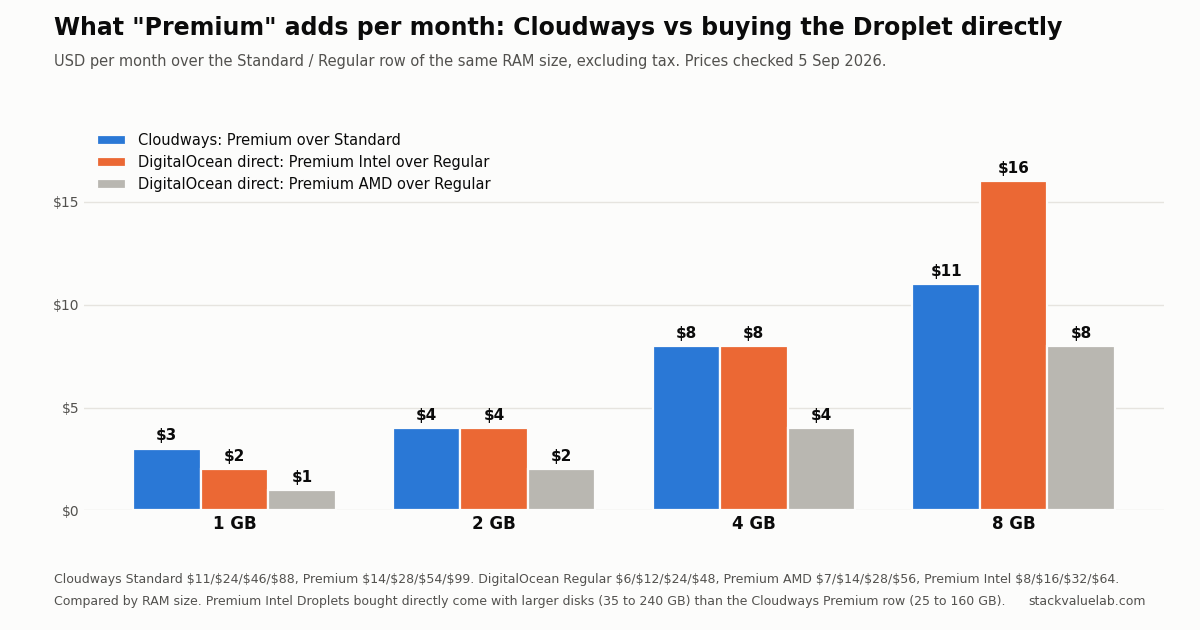
Premium adds $3, $4, $8 or $11 a month to the 1, 2, 4 and 8 GB DigitalOcean servers (27%, 17%, 17% and 12.5% over Standard) with the same RAM, vCPU, disk size and transfer. In DigitalOcean’s own words it buys NVMe SSDs and a guaranteed newer CPU generation; Cloudways adds a 10 Gbps network ceiling against 2 Gbps. DigitalOcean charges $1–$8 for the same distinction on its Premium AMD line.
Key finding Standard is the price floor for a site that fits in its RAM. Premium is for disk-bound or cache-heavy workloads, or when you want to remove the CPU-generation lottery. Cloudways bills hourly, so launching Standard first and reading the disk graphs is cheap.
Prices verified 5 September 2026 against each vendor’s own pricing page, linked in full below.
KEY FINDING. On Cloudways, the Premium toggle adds $3, $4, $8 or $11 a month to the 1, 2, 4 and 8 GB DigitalOcean servers, which is 27%, 17%, 17% and 12.5% over Standard. RAM, vCPU count, disk size and included transfer are identical on both rows. What changes, in the words of Cloudways and DigitalOcean, is the CPU generation (2nd or 3rd generation Intel Xeon Scalable on Premium, “2nd generation or earlier” on Standard), the disk type (NVMe instead of SSD) and the network ceiling Cloudways quotes (up to 10 Gbps instead of 2 Gbps). DigitalOcean charges for a comparable upgrade as well, but there is no clean like for like, because DigitalOcean sells two premium lines and the Cloudways Premium row matches one of them on disk size and the other on the CPU name. Measured against Premium AMD, which has the same disk sizes, the Cloudways markup is 3.0x, 2.0x, 2.0x and 1.4x what DigitalOcean charges. Measured against Premium Intel, which is the CPU family Cloudways names, it is 1.5x, 1.0x, 1.0x and 0.7x, so on the 8 GB size Cloudways charges less for the upgrade than DigitalOcean does. Which of those two you quote decides whether the Cloudways Premium toggle looks expensive, so this page gives both and the table below shows the sizes each one buys.
Updated 8 September 2026. The earlier version of this paragraph compared the Cloudways Premium markup only against DigitalOcean Premium AMD and called that the same distinction. It is not: Cloudways describes its Premium row as Intel Xeon Scalable while shipping the AMD disk sizes, so the comparison has to be made both ways. The row by row caveat further down already said this; the summary now agrees with it.
Both tiers are in the managed hosting cost calculator, so you can see what the Premium premium looks like next to a control panel on a Droplet you buy yourself.
The price gap, size by size
Prices are the ones displayed on the Cloudways pricing page on 5 September 2026, DigitalOcean provider, Standard and Premium rows, before tax.
| Server | Standard | Premium | Extra per month | Extra per year | Premium over Standard |
|---|---|---|---|---|---|
| 1 GB, 1 vCPU, 25 GB, 1 TB | $11 ($0.0164/hr) | $14 ($0.0208/hr) | $3 | $36 | 27.3% |
| 2 GB, 1 vCPU, 50 GB, 2 TB | $24 ($0.0357/hr) | $28 ($0.0417/hr) | $4 | $48 | 16.7% |
| 4 GB, 2 vCPU, 80 GB, 4 TB | $46 ($0.0685/hr) | $54 ($0.0804/hr) | $8 | $96 | 17.4% |
| 8 GB, 4 vCPU, 160 GB, 5 TB | $88 ($0.131/hr) | $99 ($0.1473/hr) | $11 | $132 | 12.5% |
Two things are easy to miss. First, the pricing page opens with the Premium toggle already on, so the first number most people see is $14, not $11. Second, the specification line under each Premium price says “NVMe Storage” while the Standard line says “SSD Storage”, and that is the only difference in the spec lines themselves. The difference is spelled out one level up, in the text next to the toggle. Standard: “DigitalOcean Standard Droplets, powered by 2nd generation or earlier Intel CPUs and standard SSD, are perfect for general-purpose workloads and all your applications, offering networking speeds up to 2 Gbps.” Premium: “DigitalOcean Premium Droplets are powered by 2nd or 3rd Generation Intel Xeon Scalable processors and faster NVME storage delivering higher network throughput up to 10 Gbps for your most demanding applications.”
What Premium means, in DigitalOcean’s words
Cloudways resells DigitalOcean Basic Droplets, and DigitalOcean documents the Regular versus Premium distinction directly:
“Premium CPU Droplets have either second or third generation Intel Xeon Scalable processors or second or third generation AMD EPYC processors. Regular CPU Droplets have a mix of first generation or older Xeon Scalable processors and AMD EPYC processors.”
“Basic Droplets with Premium CPUs are guaranteed to use one of the latest two generations of CPUs we have and NVMe SSDs.”
So Premium is a set of guarantees, not a bigger machine: a newer CPU generation, NVMe rather than SATA-class SSD, and on Cloudways’ description a higher network ceiling. DigitalOcean’s documentation frames the benefit as “faster disk performance” and “enhanced memory performance” for “workloads like in-memory databases and server-side caches for web apps”. Regular is a lottery on CPU generation; Premium removes the lottery. The same Premium row costs exactly what Vultr Standard costs on Cloudways, which is the comparison in Cloudways on DigitalOcean vs Vultr.
What the same distinction costs when you buy it from DigitalOcean directly
DigitalOcean’s pricing page has three tabs for Basic Droplets: Regular, Premium Intel and Premium AMD. Same day, same sizes:
| Size | DigitalOcean Regular | DigitalOcean Premium AMD | DigitalOcean Premium Intel | Cloudways Standard | Cloudways Premium |
|---|---|---|---|---|---|
| 1 GB | $6 (25 GB) | $7 (25 GB) | $8 (35 GB) | $11 | $14 |
| 2 GB, 1 vCPU | $12 (50 GB) | $14 (50 GB) | $16 (70 GB) | $24 | $28 |
| 4 GB, 2 vCPU | $24 (80 GB) | $28 (80 GB) | $32 (120 GB) | $46 | $54 |
| 8 GB, 4 vCPU | $48 (160 GB) | $56 (160 GB) | $64 (240 GB) | $88 | $99 |
Read across a row and the pattern is clear. DigitalOcean charges $1, $2, $4 and $8 more for Premium AMD over Regular, and $2, $4, $8 and $16 more for Premium Intel. Cloudways charges $3, $4, $8 and $11 for its Premium row over Standard. At 1 GB the Cloudways premium is three times DigitalOcean’s AMD premium; at 8 GB it sits between the AMD and Intel premiums.
One caveat for the row-by-row reading. Cloudways describes its Premium row as Intel Xeon Scalable, but its Premium disk sizes (25, 50, 80, 160 GB) are smaller than DigitalOcean’s own Premium Intel sizes (35, 70, 120, 240 GB) and equal to the Premium AMD sizes. So a Cloudways Premium server is not the same disk allocation as the Premium Intel Droplet you would buy directly, and the comparison above is by RAM size, not by identical machine.
Put as a multiple of the underlying Droplet, Cloudways Standard runs 1.83 to 2.00 times DigitalOcean Regular, and Cloudways Premium runs 1.77 to 2.00 times Premium AMD. The management layer is priced the same way on both rows; Premium is not a higher-margin product in percentage terms, it is simply a more expensive Droplet with the same multiplier applied.
Who the extra $3 to $11 is for
The honest answer follows DigitalOcean’s own framing rather than a benchmark, because this article did not run one.
Premium is the right row when the workload is disk-bound or cache-heavy: a database that spills to disk, Redis or Object Cache Pro under real load, a WooCommerce or Magento store with large catalog queries, or anything where you would otherwise be tuning I/O. It is also the right row if you want to remove the CPU-generation lottery for a client site, because Regular can land on first-generation Xeon or older hardware, and you cannot pick.
Standard is the price floor for a first site. In our own measurement of a small WordPress stack, the whole thing (Caddy, PHP-FPM and MariaDB) used about 262 MiB of memory at idle, so on a 1 GB server the binding constraint is usually RAM and PHP worker count, not disk generation. That measurement says nothing about CPU speed, so the fair statement is narrower: if your site fits comfortably in its RAM and is not disk-bound, the $3 buys a guarantee whose effect on your page times we have not measured.
Because Cloudways bills hourly and the trial does not need a card, the cheapest way to answer the question for your own site is to launch Standard, look at the server’s disk and CPU graphs for a few days, and only then decide whether the Premium row is worth $36 to $132 a year. Cloudways charges for a server while it exists, stopped or not, so delete the test server when you are done rather than stopping it.
Change log
| Date | Change |
|---|---|
| 5 Sep 2026 | First published. Cloudways and DigitalOcean prices checked the same day. |
Sources
- Cloudways pricing page, DigitalOcean provider, Standard and Premium rows: https://www.cloudways.com/en/pricing.php
- DigitalOcean Droplet pricing, Regular / Premium Intel / Premium AMD tabs: https://www.digitalocean.com/pricing/droplets
- DigitalOcean documentation, “Choosing a plan”, Premium versus Regular CPU: https://docs.digitalocean.com/products/droplets/concepts/choosing-a-plan/
- Related on this site: Cloudways pricing, line by line, Cloudways vs Kinsta pricing, Managed hosting vs a VPS you run yourself, How much RAM WordPress needs, measured