On Cloudways, should you pick DigitalOcean or Vultr?
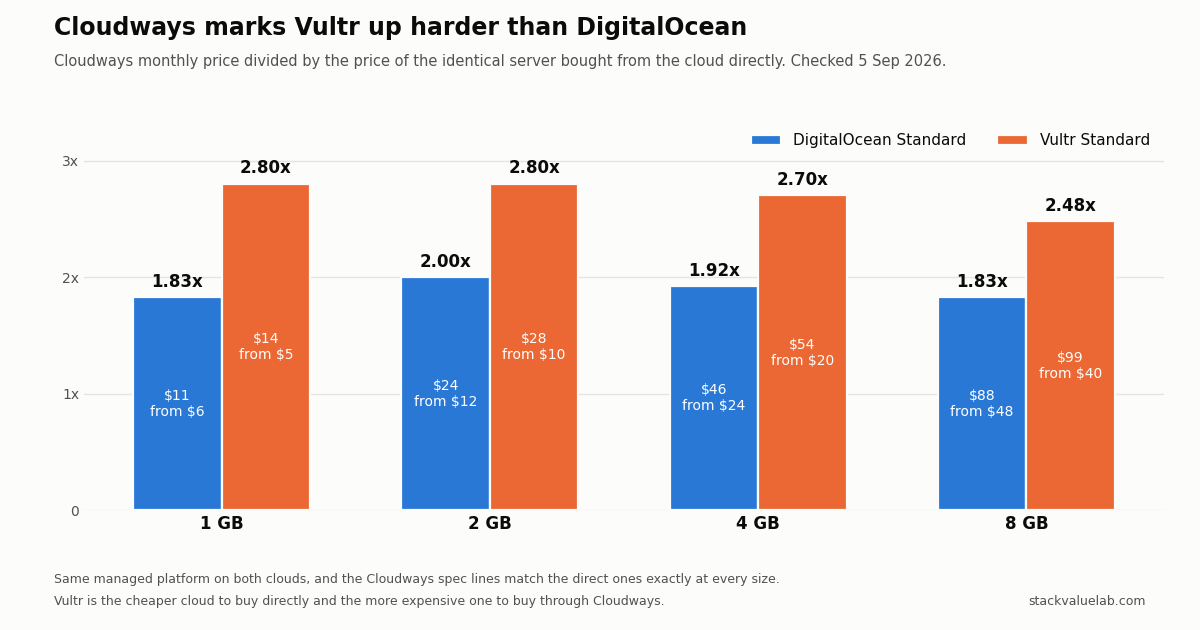
DigitalOcean is cheaper at every size: $11, $24, $46 and $88 against Vultr’s $14, $28, $54 and $99, and it includes 1 TB more transfer at 4 and 8 GB. Cloudways also marks Vultr up harder, 2.48–2.80x the direct price against 1.83–2.00x for DigitalOcean. Vultr’s advantage is coverage: 32 locations against 10.
Key finding Cloudways DigitalOcean Premium and Vultr Standard cost exactly the same ($14/$28/$54/$99), but Premium is the newer CPU generation with NVMe and more transfer. Pick Vultr when you need a city DigitalOcean does not have, such as Seoul, Tokyo, Osaka, Warsaw or São Paulo.
Prices verified 5 September 2026 against each vendor’s own pricing page, linked in full below.
KEY FINDING. Cloudways sells the same managed platform on both clouds, so the choice is the machine underneath and where it sits. On price, DigitalOcean wins at every size: $11, $24, $46 and $88 against Vultr’s $14, $28, $54 and $99, which is $3 to $11 more a month, or $36 to $132 a year, for a machine with the same RAM and vCPU count and, at 4 and 8 GB, 1 TB less included transfer. Cloudways also marks Vultr up harder: 2.48 to 2.80 times the price of the identical server bought from Vultr, against 1.83 to 2.00 times for DigitalOcean. Vultr’s real argument is coverage. Cloudways offers 32 Vultr locations and 10 DigitalOcean ones. In Asia, DigitalOcean has Singapore and Bangalore; Seoul, Tokyo, Osaka, Delhi and Mumbai are on Vultr only.
Both ladders are in the managed hosting cost calculator, next to the control panel and fixed-price routes, if you want to see where they land against the alternatives rather than only against each other.
The price ladder, side by side
Prices are the ones displayed on the Cloudways pricing page and the Vultr provider page on 5 September 2026, before tax, hourly billing.
| RAM | DigitalOcean Standard | Vultr Standard | Vultr costs more by | DigitalOcean Premium | Vultr High Frequency |
|---|---|---|---|---|---|
| 1 GB | $11 | $14 | $3 | $14 | $16 |
| 2 GB | $24 | $28 | $4 | $28 | $30 |
| 4 GB | $46 | $54 | $8 | $54 | $60 |
| 8 GB | $88 | $99 | $11 | $99 | $118 |
What each of those buys:
| RAM | DigitalOcean Standard | Vultr Standard |
|---|---|---|
| 1 GB | 1 vCPU, 25 GB SSD, 1 TB transfer | 1 vCPU, 25 GB SSD, 1 TB transfer |
| 2 GB | 1 vCPU, 50 GB SSD, 2 TB | 1 vCPU, 55 GB SSD, 2 TB |
| 4 GB | 2 vCPU, 80 GB SSD, 4 TB | 2 vCPU, 80 GB SSD, 3 TB |
| 8 GB | 4 vCPU, 160 GB SSD, 5 TB | 4 vCPU, 160 GB SSD, 4 TB |
The 2 GB Vultr server has 5 GB more disk. The 4 and 8 GB DigitalOcean servers have 1 TB more included transfer. Everything else on those rows matches. So at the bottom of the range you are paying $3 a month for nothing you can point at on the spec sheet, and at the top you are paying $11 a month for a terabyte less.
The comparison that actually matters: same price, different machine
Set the two mid rows next to each other and the interesting pair is not Standard against Standard.
DigitalOcean Premium and Vultr Standard cost exactly the same: $14, $28, $54 and $99. At that price, this is what each side says it gives you.
| DigitalOcean Premium | Vultr Standard | |
|---|---|---|
| Cloudways’ description | “2nd or 3rd Generation Intel Xeon Scalable processors and faster NVME storage delivering higher network throughput up to 10 Gbps” | “previous generation Intel CPUs and regular SSD” |
| Disk at 4 GB | 80 GB NVMe | 80 GB SSD |
| Transfer at 4 GB | 4 TB | 3 TB |
| Transfer at 8 GB | 5 TB | 4 TB |
| Locations | 10 | 32 |
For the same money, DigitalOcean Premium is the newer CPU generation, NVMe instead of SATA-class SSD, a higher stated network ceiling, and more included transfer. Vultr Standard is an older CPU generation and a regular SSD. That is not a close call on the spec sheet, and it means the honest way to frame Vultr Standard is not “the pricier option”, it is “the option you take when you need a city DigitalOcean does not have”.
If you want NVMe and a fast clock on Vultr, the comparable line is High Frequency, described as “high clock speed 3GHz+ Intel Xeon CPUs and NVMe local storage”. That runs $16, $30, $60 and $118, so $2 to $19 above DigitalOcean Premium, and it buys noticeably more disk: 32, 64, 128 and 256 GB against 25, 50, 80 and 160. One thing to check before you size it: the 8 GB High Frequency server has 3 vCPUs, where the 8 GB Vultr Standard has 4.
None of this is a speed measurement. We did not benchmark either cloud, and neither vendor publishes a like-for-like benchmark, so the sentences above are about what is sold, not about what your pages will do.
What Cloudways charges over the underlying cloud
Both clouds sell the same machines directly, and the Cloudways spec lines match the direct ones exactly, size for size, so the multiple is easy to compute.
| RAM | Vultr direct | Cloudways Vultr | Multiple | DigitalOcean direct | Cloudways DigitalOcean | Multiple |
|---|---|---|---|---|---|---|
| 1 GB | $5 | $14 | 2.80x | $6 | $11 | 1.83x |
| 2 GB | $10 | $28 | 2.80x | $12 | $24 | 2.00x |
| 4 GB | $20 | $54 | 2.70x | $24 | $46 | 1.92x |
| 8 GB | $40 | $99 | 2.48x | $48 | $88 | 1.83x |
Vultr is the cheaper cloud to buy from directly at every size, and the more expensive one to buy through Cloudways. The management service is identical on both, so the gap is a pricing decision, not a difference in what you receive. On the High Frequency line the multiple is 2.46 to 2.67 times. Control panels price the same job as a flat fee instead, which changes the answer at larger sizes: see managed DigitalOcean hosting.
That is worth knowing for one specific decision: if you were choosing Cloudways mainly to avoid server administration on a cheap Vultr box, the management layer is costing you roughly two and a half times the machine, where the same layer on DigitalOcean costs roughly twice. Our own cost-per-hour model puts that difference in hours of your time.
Locations: the one place Vultr is clearly ahead
Cloudways’ data center page lists cities per provider. Counted from that page on 5 September 2026:
| Provider | Cities on Cloudways |
|---|---|
| Google Cloud | 36 |
| AWS | 33 |
| Vultr | 32 |
| Linode | 27 |
| DigitalOcean | 10 |
DigitalOcean’s ten are Toronto, Atlanta, New York, San Francisco, Frankfurt, Amsterdam, London, Singapore, Bangalore and Sydney. That is a North America, Western Europe and one-stop-in-Asia footprint.
Vultr’s thirty-two include eleven in North America, eight in Europe including Warsaw, Madrid, Stockholm and Manchester, Tel Aviv, São Paulo and Santiago, Johannesburg, and in Asia Seoul, Tokyo, Osaka and Singapore, plus Delhi and Mumbai alongside Bangalore.
So the practical rule is short. If your readers are in a city DigitalOcean serves, DigitalOcean is cheaper for the same machine and gives you more transfer at the larger sizes. If they are in Seoul, Tokyo, Osaka, Warsaw, Madrid, Stockholm, Tel Aviv, São Paulo, Johannesburg or Delhi, DigitalOcean is not an option on Cloudways at all and the $3 to $11 is what proximity costs.
Choosing
- Default to DigitalOcean Standard. Cheapest at every size, more transfer at 4 and 8 GB, lowest markup over the underlying cloud.
- DigitalOcean Premium instead of Vultr Standard at the same price, unless location decides it. Newer CPU generation, NVMe, more transfer.
- Vultr Standard when the location matters and the workload is not disk-bound. You are buying the city, not the hardware.
- Vultr High Frequency when the location matters and the disk does too. It is the NVMe line on that cloud, with two to three times the disk of the DigitalOcean row at a similar price. Check the vCPU count at 8 GB.
- Add-on pricing does not break the tie: off-site backup storage is $0.033 per GB per server on both.
Because Cloudways bills hourly and the trial does not need a card, testing the actual choice costs very little. Launch in the city you care about, look at the server’s own graphs, and remember that Cloudways charges for a server while it exists, stopped or not, so delete the test rather than stopping it.
Change log
| Date | Change |
|---|---|
| 5 Sep 2026 | First published. Cloudways, Vultr and DigitalOcean prices and the data center list checked the same day. |
Sources
- Cloudways pricing page, DigitalOcean provider: https://www.cloudways.com/en/pricing.php
- Cloudways Vultr provider page, Standard and High Frequency server types: https://www.cloudways.com/en/vultr-hosting.php
- Cloudways data center list, counted per provider: https://www.cloudways.com/en/datacenters.php
- Vultr pricing, Cloud Compute Regular Performance and High Frequency: https://www.vultr.com/pricing/
- DigitalOcean Droplet pricing: https://www.digitalocean.com/pricing/droplets
- Related on this site: Cloudways pricing, line by line, Cloudways Standard vs Premium, Cloudways vs Kinsta pricing, Managed hosting vs a VPS you run yourself