How much does Cloudways actually cost?
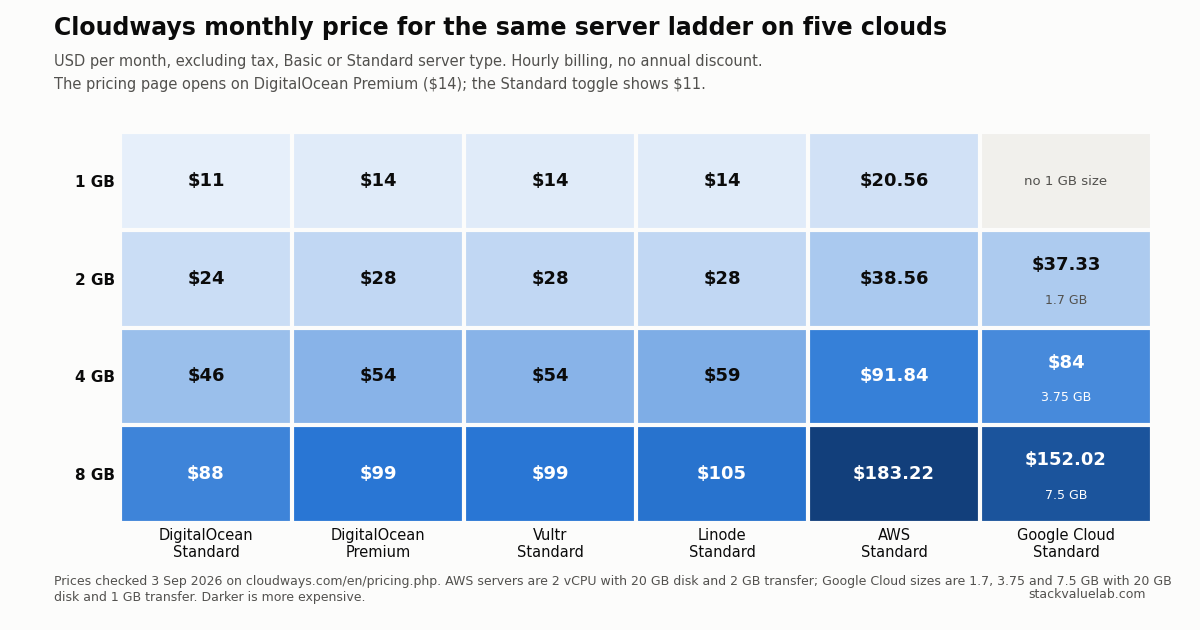
From $11 per month for a 1 GB DigitalOcean server on the Standard tier. The pricing page opens with the Premium toggle on, which shows $14 for the same server with NVMe storage. The 1, 2, 4 and 8 GB ladder is $11–$88 on DigitalOcean Standard, $14–$99 on Vultr, $14–$105 on Linode and $20.56–$183.22 on AWS. Hourly billing, no annual discount, no visit metering.
Key finding Redis, Object Cache Pro (4 GB and up), staging and one migration are included. The Cloudflare Enterprise CDN (from $4.99 per domain), off-site backups ($0.033 per GB) and malware protection (from $4 per app) are not.
Prices verified 3 September 2026 against each vendor’s own pricing page, linked in full below.
KEY FINDING. The lowest Cloudways price is $11.00 per month, for a 1 GB DigitalOcean server on the Standard tier. The pricing page does not open there: it opens with the Premium toggle on, which shows $14. The same 1, 2, 4 and 8 GB ladder costs $11 to $88 on DigitalOcean Standard, $14 to $99 on DigitalOcean Premium and on Vultr, $14 to $105 on Linode, $20.56 to $183.22 on AWS, and $37.33 to $152.02 on Google Cloud, where the sizes are 1.7, 3.75 and 7.5 GB. Billing is hourly with no annual discount and no visit metering. Redis, Object Cache Pro on 4 GB and larger servers, staging, SSL, a server firewall and one free migration are included. The Cloudflare Enterprise CDN (from $4.99 per domain), off-site backup storage ($0.033 per GB), malware protection (from $4 per app) and priority support ($100 per month) are not.
If you want this ladder priced against the alternatives rather than on its own, the managed hosting cost calculator puts every figure below next to the control panel and fixed-price routes at whatever bandwidth you actually use.
Prices read from the Cloudways pricing page and support documentation on 3 September 2026. USD, excluding tax. No purchase was made.
Disclosure: StackValue has a disclosed affiliate relationship with Cloudways. The affiliate links are in the box at the end of this page and do not change any price or conclusion here.
Answer in 30 seconds
- The real entry price is $11, not $14. Flip the Standard/Premium toggle on the pricing page. Premium buys NVMe storage and a newer CPU generation on DigitalOcean; the RAM, vCPU, disk size and transfer allowance are the same. What that $3 to $11 actually buys is taken apart in Cloudways Standard vs Premium.
- The cloud you pick matters more than the size you pick. A 2 GB server is $24 on DigitalOcean Standard and $38.56 on AWS. Moving from 2 GB to 4 GB on DigitalOcean Standard costs $22; moving the same 2 GB server from DigitalOcean to AWS costs $14.56 for less disk and far less transfer.
- There is no annual plan. You pay by the hour, invoiced monthly. That is good for trying things and neutral for long-term cost: the price is the price.
- Budget for the add-ons you would actually use. A CDN, malware removal and an off-site backup copy are the three most people add. On a $11 server they take the bill to roughly $20.
Below: why the page shows $14, all five clouds side by side, what is included, what costs extra, the overage rules, three worked bills, and where Autonomous fits.
Why the page shows $14 and not $11
The Cloudways pricing page loads with DigitalOcean selected and a Standard / Premium switch set to Premium. In that state the four Basic servers read $14, $28, $54 and $99. Switch to Standard and the same four servers read $11, $24, $46 and $88.
| DigitalOcean Basic | RAM | vCPU | Storage | Transfer | Standard | Premium |
|---|---|---|---|---|---|---|
| Micro | 1 GB | 1 | 25 GB | 1 TB | $11.00 ($0.0164/hr) | $14.00 ($0.0208/hr) |
| Small | 2 GB | 1 | 50 GB | 2 TB | $24.00 ($0.0357/hr) | $28.00 ($0.0417/hr) |
| Medium | 4 GB | 2 | 80 GB | 4 TB | $46.00 ($0.0685/hr) | $54.00 ($0.0804/hr) |
| Large | 8 GB | 4 | 160 GB | 5 TB | $88.00 ($0.1310/hr) | $99.00 ($0.1473/hr) |
The page labels Standard storage as SSD and Premium storage as NVMe. Everything else on the card is identical. Whether NVMe is worth $3 to $11 a month depends on how disk-bound your site is, and this page makes no claim about that. What it does claim is that the $14 figure most people quote as “Cloudways starts at” is the Premium price of a server that also exists at $11.
All five clouds, same ladder
Cloudways resells five infrastructure providers. The Basic or Standard server type on each, read from the pricing page on 3 September 2026:
| Cloud, tier | 1 GB | 2 GB | 4 GB | 8 GB | Storage and transfer notes |
|---|---|---|---|---|---|
| DigitalOcean Standard | $11.00 | $24.00 | $46.00 | $88.00 | 25/50/80/160 GB SSD; 1/2/4/5 TB |
| DigitalOcean Premium | $14.00 | $28.00 | $54.00 | $99.00 | Same sizes, NVMe |
| Vultr Standard | $14.00 | $28.00 | $54.00 | $99.00 | 25/55/80/160 GB SSD; 1/2/3/4 TB |
| Linode Standard | $14.00 | $28.00 | $59.00 | $105.00 | 25/50/80/160 GB SSD; 1/2/4/5 TB |
| AWS Standard | $20.56 | $38.56 | $91.84 | $183.22 | 2 vCPU at every size; 20 GB; 2 GB transfer |
| Google Cloud Standard | n/a | $37.33 (1.7 GB) | $84.00 (3.75 GB) | $152.02 (7.5 GB) | 20 GB; 1 GB transfer |
Three things the table shows that the marketing does not.
First, DigitalOcean Standard is the only column that starts at $11. Every other entry point is $14 or more.
Second, AWS and Google Cloud are a different product at the same nominal size. They ship 20 GB of disk instead of 25 to 160 GB, and 1 or 2 GB of included transfer instead of 1 to 5 TB. Traffic on those two is billed per GB from the first byte beyond that allowance, at $0.12 per GB on AWS and $0.11 to $0.17 per GB on Google Cloud. A site that would fit comfortably inside a DigitalOcean allowance can produce a meaningful bandwidth line on AWS. Cloudways also states in its pricing FAQ that AWS and Google Cloud prices differ by region and that it passes those differences on, with Asia Pacific and South America generally costing more than North America and Europe. The AWS and Google Cloud figures in this article are the ones displayed on the pricing page; the amount for a specific region is only shown inside the platform at launch.
Third, Google Cloud’s sizes do not line up. Its smallest Standard server is 1.7 GB with a shared CPU, then 3.75 GB and 7.5 GB. If you compare it to the 2, 4 and 8 GB rows elsewhere, you are comparing to slightly smaller machines at higher prices.
The pricing page also lists higher server types: General Purpose and CPU Optimized on DigitalOcean, Vultr and Linode, Compute Optimized on AWS and Google Cloud, High Frequency on Vultr and High Compute on Google Cloud. The DigitalOcean and Vultr ladders, including High Frequency, are compared row by row in Cloudways on DigitalOcean vs Vultr. Those are priced higher and are not tabulated here.
Purchase reality
What you are asked to pay, on what term, and what it renews at.
| Plan | Amount due today | Billing | Renews at | Tax | Checked |
|---|---|---|---|---|---|
| DigitalOcean Standard 1 GB | $0 (3-day trial, no card) | Hourly, invoiced monthly in arrears | $11.00/mo | Excluded | 3 Sep 2026 |
| DigitalOcean Standard 2 GB | $0 (3-day trial, no card) | Hourly, invoiced monthly in arrears | $24.00/mo | Excluded | 3 Sep 2026 |
| DigitalOcean Premium 1 GB | $0 (3-day trial, no card) | Hourly, invoiced monthly in arrears | $14.00/mo | Excluded | 3 Sep 2026 |
| Autonomous Growth | $0 (3-day trial) | Monthly | $99.00/mo plus usage | Excluded | 3 Sep 2026 |
Two consequences of hourly billing are worth knowing before you compare Cloudways to hosts that sell annual terms. A server that exists is billed whether or not it is doing anything; deleting it stops the charge, and the monthly figure is the ceiling for a full month. And because there is no annual discount, the monthly price you see is the price in month twelve as well. Kinsta, for comparison, sells ten months for twelve on annual billing; our Cloudways vs Kinsta pricing page sets the two side by side.
Cloudways applies VAT or GST according to the billing country. Every price on this page is before that.
Included, and not included
Included in every Flexible plan (from the pricing page): unlimited applications and visits within the server’s capacity, 24/7 support, Let’s Encrypt SSL, a server-level firewall (Imunify360), staging with one-click push, automated on-server backups, a WordPress vulnerability scanner, Redis, Object Cache Pro on 4 GB servers and above (the page values it at $95 per month), and migration of your first site by Cloudways engineers.
Not included, priced on the pricing page:
| Add-on | Price | Notes |
|---|---|---|
| Cloudflare Enterprise CDN | From $4.99 per domain per month | Edge page caching, Argo smart routing, enterprise features |
| Off-site backup storage | $0.033 per GB per server | Rounded up to the next $0.50 on the invoice |
| Malware Protection | From $4 per app per month | Automated malware removal |
| Site Manager | From $3 per app per month | Multi-site dashboard, safe updates, visual regression |
| Advance Support | $100 per month, or 10% of invoice | The page was advertising a limited-time $25 flat rate on the check date |
| Rackspace Email | $1.50 per mailbox per month | Cloudways does not otherwise host email |
| DNS Made Easy | $0.50 per domain per month | Fast-propagation DNS |
The rounding rule on backups matters at small sizes: a 10 GB off-site copy is $0.33 by the rate and $0.50 on the invoice. It stops mattering at about 15 GB.
Overage rules
Cloudways has no visit counter, so the only usage-based lines are bandwidth beyond the allowance and off-site backup storage.
| Item | Rule |
|---|---|
| Bandwidth over allowance, DigitalOcean | $0.02 per GB |
| Bandwidth over allowance, Linode | $0.02 per GB, pooled across servers |
| Bandwidth over allowance, Vultr | $0.01 per GB in North America and Western Europe, $0.025 in Singapore and Tokyo, $0.05 in Sydney |
| Bandwidth, AWS | $0.12 per GB, pay as you go |
| Bandwidth, Google Cloud | $0.11 to $0.17 per GB by region, pay as you go |
| Storage full | Resize to the next server size; block storage is available on DigitalOcean and priced separately |
| Off-site backups | $0.033 per GB of stored backup data, incremental |
Running out of RAM or CPU is not an overage. Nothing is billed; the site slows down, and the fix is a resize to the next size, which is a step of $13 to $42 a month on DigitalOcean Standard.
Three worked bills
Example calculations from the prices above. They are illustrations, not quotes.
A small site on the cheapest server, done properly. DigitalOcean Standard 1 GB at $11.00, Cloudflare Enterprise at $4.99, and an off-site copy of a 10 GB backup at $0.50 after rounding: $16.49 per month. Add Malware Protection at $4 and it is $20.49. The $11 sticker becomes a $16 to $20 bill once the site has a CDN and an off-site backup, which is still less than most managed WordPress hosts charge for one site.
A store on a 4 GB server. DigitalOcean Standard 4 GB at $46.00, Cloudflare Enterprise $4.99, Malware Protection $4.00, two Rackspace mailboxes at $3.00, and a 30 GB off-site backup at $0.99, which rounds to $1.00: $58.99 per month. Object Cache Pro and Redis are included at this size, which is the reason a 4 GB server is often the right first step for WooCommerce rather than a 2 GB one plus add-ons.
The same 2 GB server on two clouds. DigitalOcean Standard 2 GB is $24.00 with 50 GB of disk and 2 TB of transfer. AWS Standard 2 GB is $38.56 with 20 GB of disk and 2 GB of transfer. If the site moves 200 GB a month, AWS adds about 198 GB at $0.12, or $23.76, for a total near $62.32 against $24.00. The AWS server has two vCPUs to DigitalOcean’s one, and it may be the right choice for reasons of region or compliance. It is not the right choice for price.
Where Autonomous fits
Autonomous is a separate product line: a fully managed, autoscaling WordPress platform with its own pricing.
| Plan | Monthly | Sites | Baseline servers | Bandwidth | Disk | Autoscaling beyond baseline |
|---|---|---|---|---|---|---|
| Growth | $99.00 | 1 | 1 | 150 GB | 20 GB | $0.07 per server-hour |
| Scale | $199.00 | 1 | 2 | 250 GB | 50 GB | $0.10 per server-hour |
| Plus | $399.00 | 1 | 3 | 1,000 GB | 100 GB | $0.12 per server-hour |
All three include Cloudflare Enterprise, Redis, Object Cache Pro with Relay, 100 PHP workers per server, unmetered visits and a managed migration. Extra disk is $1 per GB and extra bandwidth is $0.04 per GB. Backups are included in the plan price rather than billed per GB.
The comparison that matters is not Autonomous versus Flexible at the same price; it is what you are buying. Flexible sells a server you size. Autonomous sells a traffic ceiling you do not have to think about, for one site, at nine times the price of the cheapest Flexible server. If the site is a single high-traffic store or course platform with spiky load, that trade can be correct. For a portfolio of small sites it is the wrong product.
Method, limitations and sources
Method. Every price was read from the Cloudways pricing page in a browser on 3 September 2026, switching the cloud provider tab for each of the five clouds, checking both positions of the DigitalOcean Standard/Premium toggle, and opening the Autonomous tab for its three plans. Add-on prices come from the same page. Overage and backup rules come from the Cloudways support articles linked below. A link to the managed hosting cost calculator was added on 5 September 2026; no price, table or ranking in this article changed.
Limitations.
- No purchase was made. Trial mechanics, tax and rounding are as documented, not as invoiced.
- General Purpose, CPU Optimized and High Frequency server types were not tabulated.
- DigitalOcean block storage pricing at Cloudways was not captured.
- Cloudways’ on-server backup frequency and retention options are not priced on the pricing page and were not verified here.
- The “limited time” Advance Support price and any seasonal promotion change without notice; this page records the standard prices.
Sources.
- Cloudways pricing, all plan, server type and add-on prices, including the Autonomous tab
- Cloudways guide to billing, hourly billing summarized monthly, taxes by billing country
- Bandwidth charges of infrastructure providers, per-GB overage by cloud
- Charges for off-site backups, $0.033 per GB and the $0.50 rounding rule
Related reading. Cloudways vs DigitalOcean cost prices the managed layer against the bare droplet underneath it. Cloudways vs Kinsta compares it with a host that meters by site. For the unmanaged baseline, what a GB of RAM costs and what a TB of bandwidth costs cover the same providers without the management fee, and how much RAM WordPress actually uses is the measurement behind the 1 GB and 2 GB choice. VPS backup pricing puts the $0.033 per GB off-site rate next to nine other providers.
Change log.
| Date | Change |
|---|---|
| 3 Sep 2026 | First published. Prices checked the same day. |
| 4 Sep 2026 | Added the regional-pricing caveat for AWS and Google Cloud from the Cloudways pricing FAQ. No price changed. |